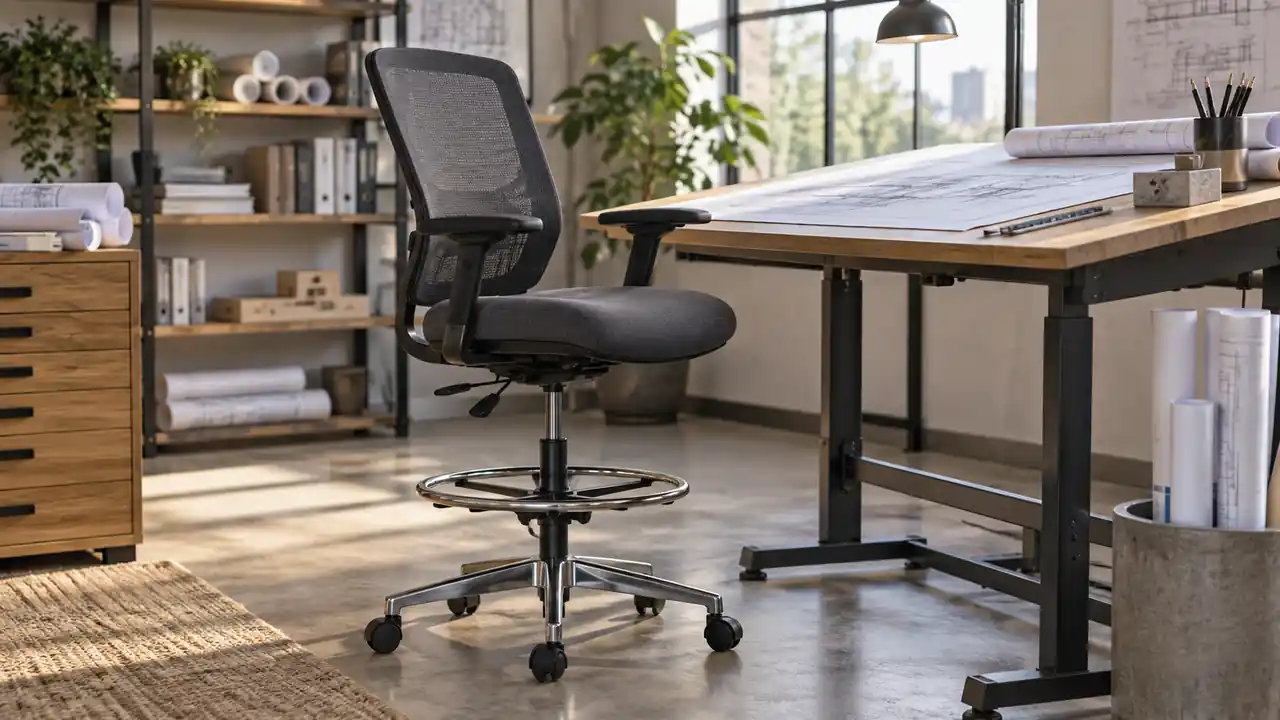
When a standard office chair leaves your knees tucked under a tall work surface, the problem is often not the desk. It may be the chair. A drafting chair is a height-adjustable seat designed for elevated work surfaces such as drafting tables, studio counters, laboratory benches, and other workstations that sit higher than an ordinary desk.
Its familiar features include a taller seat range, a foot ring or footrest, and controls for adjusting height and sometimes the backrest, seat angle, or armrests. The purpose is straightforward: position the user close enough to the work surface while still providing practical support for the feet and lower body. That makes the chair different from both a conventional office chair and a backless drafting stool.
What Is a Drafting Chair?
A drafting chair is an elevated work chair intended for use at a high desk, drafting table, counter, or similar surface. It usually has a five-point base with casters, a padded seat, a backrest, and a pneumatic height adjustment. Many models also include a circular foot ring, although that feature is not universal.
The seat is higher because the work surface is higher. A person sitting at a conventional desk generally expects both feet to reach the floor and the forearms to rest near desk height. At a drafting table or studio counter, raising the chair helps bring the torso and arms into a comparable working position. The foot ring gives the feet somewhere to rest when the seat is elevated beyond ordinary chair height.
For example, someone sketching on a tilted drawing board may raise the chair so the forearms can approach the lower edge of the board without leaning heavily across the table. In another workspace, a designer seated at a counter-height computer station may need a taller chair simply to look straight at the monitor and reach the keyboard comfortably. The chair is not “drafting” because of a special drawing mechanism. Its defining characteristic is its relationship to the height of the work surface.
How a Drafting Chair Differs From an Office Chair
The central difference is elevation. An office chair is generally built around a standard desk height, while a drafting chair is intended to lift the user higher. That distinction affects more than the gas cylinder. It changes how the feet are supported, how the knees bend, and how the user approaches the work surface.
| Feature | Drafting Chair | Standard Office Chair |
|---|---|---|
| Typical use | Drafting tables, counters, studio benches, and elevated workstations | Standard desks and conventional computer workstations |
| Seat height | Usually higher, with an adjustment range suited to elevated surfaces | Usually suited to ordinary desk height |
| Foot support | Often includes a built-in foot ring or footrest | Usually relies on the floor or a separate footrest |
| Work-surface relationship | Allows the user to sit closer to a high surface | May leave the user too low for a high table or counter |
| Common design emphasis | Height, elevated seating, and support at a raised workstation | Desk-level seating, back support, and general office adjustment |
The categories can overlap. Some office chairs have a generous height range, and some drafting chairs are designed for computer work as much as drawing. The label alone does not determine whether a chair will fit a particular workspace. The usable seat-height range, the clearance beneath the table, the foot-support design, and the relationship between the seat and desktop matter more.
Why Drafting Chairs Have Foot Rings
A foot ring is the circular bar attached around the chair column or base. It provides a place for the feet when the chair is raised high enough that the floor is no longer a comfortable or practical support point.
Consider a student sitting at a tall studio table. With a regular chair, the student may be too low to see the drawing clearly. Raising a drafting chair solves the eye-level problem, but the feet may then dangle or press awkwardly against the chair base. Placing both feet on the ring creates a stable resting point. At a counter workstation, the ring performs a similar job during long periods of keyboard or sketching work.
Foot rings vary in shape and position. Some are fixed to the central column, while others rotate or form part of the chair base. A ring is useful, but it does not automatically make every elevated chair comfortable. The ring should be reachable without forcing the feet into an unusually narrow or strained position, and it should not interfere with the chair’s casters or nearby equipment.
A separate footrest can serve a similar purpose when a chair has no built-in ring. That arrangement may be helpful when several people use the same workstation, since the footrest can be repositioned independently. It also allows the user to choose a wider or more substantial support than the chair’s original design provides.
Drafting Chair Features and What They Do
Height Adjustment
Height adjustment is the feature that separates a drafting chair from a fixed-height stool. A pneumatic lever usually raises or lowers the seat while the user is seated or slightly unweighted, depending on the mechanism. The useful range is not simply the maximum advertised height. It must place the seat at a workable relationship to the specific drafting table or counter.
At a tilted board, the user may need enough elevation for the upper body to approach the drawing without hunching. At a flat computer counter, the chair must also leave room for the thighs beneath the surface. These are different setups, so one chair height cannot be called correct for every drafting task.
Backrest
Some drafting chairs use a compact backrest, while others resemble tall task chairs with a larger back. A backrest can provide a place to lean during reading, planning, or computer work, but it may also limit how closely the user can approach a sloped board if it is bulky or shaped for a more reclined posture.
A drafter switching between sketching and reviewing reference material may value a backrest that allows brief changes in position. Someone working close to a drawing surface may prefer a simpler profile that does not push the torso away from the table. Neither design is universally correct because the task and work surface change the requirement.
Seat Design
The seat should provide enough usable area for a stable sitting position without pressing against the backs of the knees. An edge that slopes or curves downward can make it easier to sit near the front of the chair while working at a board. A heavily contoured office-style seat may feel supportive at a computer but less convenient when the user frequently leans forward to mark, measure, or inspect a drawing.
Armrests
Armrests can support the arms during computer work, yet they may collide with the underside of a drafting table or prevent the chair from moving close enough to the work surface. A person who alternates between keyboard work and hand drafting should check whether the armrests fit beneath the table and whether they restrict the required reach.
Casters and Base
Many drafting chairs use casters so the user can move between a drawing surface, computer, and nearby storage. Smooth movement is useful, but a rolling chair should remain stable on the floor and should not drift away when the user leans toward a board. Floor type, chair construction, and the user’s movements all affect how the base behaves.
How to Set Up a Drafting Chair With a Drafting Table
Begin with the work surface rather than the chair. Note whether the table is flat or tilted, where the drawing or monitor sits, and how much space is available below the surface. A sloped board may place the upper part of the drawing much closer to eye level than the lower edge, so the chair position should support the actual task rather than a single measurement.
- Place the chair at the main working position. Leave enough room for the chair base and foot ring, and check that the table edge does not strike the backrest or armrests.
- Adjust the seat height. Raise or lower the chair until the forearms can approach the work surface without the shoulders lifting or the torso folding sharply forward.
- Check the feet. Rest both feet on the floor when possible. If the seat is too high for that, use the foot ring or a separate footrest rather than allowing the legs to hang freely.
- Inspect the knee and thigh clearance. Make sure the thighs are not pressed against the underside of the table and that the knees can move without hitting a support bar or storage unit.
- Test the working reach. Move across the normal drawing area, keyboard area, or measuring zone. If the chair must be pulled repeatedly or the shoulders rise during ordinary work, the height or table arrangement needs adjustment.
A useful check is to work briefly at the nearest and farthest parts of the drawing. Someone tracing details near the lower edge may sit differently from someone lettering near the top. Likewise, a user who spends the afternoon moving between a drafting board and a computer may need small position changes instead of one rigid posture.
Drafting Chair, Drafting Stool, and Tall Task Chair
These terms are sometimes used loosely, but they describe different designs. A drafting chair normally has a backrest and adjustable height. A drafting stool may have a backrest, a small back support, or no backrest at all. A tall task chair is often intended for a raised computer or laboratory workstation and may resemble a drafting chair even when drawing is not its primary use.
| Seat Type | Typical Characteristics | Where It May Fit |
|---|---|---|
| Drafting chair | Elevated adjustable seat, often with backrest and foot ring | Drafting tables, studio counters, and raised computer stations |
| Drafting stool | Usually simpler, sometimes backless, often focused on mobility and compactness | Shorter work sessions, workshops, counters, and limited spaces |
| Tall task chair | Raised office-style design for elevated workstations | Counter-height desks, laboratories, reception areas, and computer stations |
The names are not standardized across every manufacturer. A stool may have a backrest, and a tall task chair may include a foot ring. Reading the actual specifications is more reliable than relying on the product category alone.
Are Drafting Chairs Good for Drawing?
They can be well suited to drawing when the seat height matches the table and the chair allows the user to approach the work without obstruction. A drafting chair is especially useful at an elevated drafting table, a standing-height studio bench used while seated, or a counter-style workstation where an ordinary office chair sits too low.
It is not automatically the right seat for every drawing setup. A low writing desk may pair more naturally with an office chair, while floor-based sketching calls for an entirely different arrangement. A chair with large armrests may also be inconvenient for broad hand movements across a drawing board, even if its cushioning feels comfortable at a computer.
Manual drafting also involves frequent changes in position. The user may lean forward to draw a line, sit back to inspect proportions, stand to retrieve a scale, and shift sideways to reach a different part of the board. The chair should support those transitions without forcing the body into one fixed pose. For extended discomfort or pain, professional medical or workplace-ergonomics advice is more appropriate than treating a chair feature as a remedy.
Frequently Asked Questions
Can You Use a Drafting Chair at a Regular Desk?
Yes, but only if the chair can be lowered enough for the desk height and still provide a comfortable relationship between the seat, keyboard, and floor. A chair that remains too high may leave the feet unsupported or force the arms upward.
Does Every Drafting Chair Have a Foot Ring?
No. Many include one, but some use a conventional five-star base or rely on a separate footrest. Check the chair’s construction before assuming that elevated seating includes built-in foot support.
Is a Drafting Chair the Same as a Bar Stool?
No. A bar stool is usually a fixed-height seat designed for a bar or counter. A drafting chair is generally adjustable and may include a backrest, casters, and an integrated foot ring. Some drafting stools resemble stools, but their adjustment and workstation features distinguish them from ordinary bar seating.
What Height Should a Drafting Chair Be?
There is no single correct height. Set it in relation to the drafting table, counter, or computer surface. The arms should approach the work without excessive shoulder lifting, the thighs should clear the underside, and the feet should rest on the floor, a foot ring, or a separate footrest.
The Practical Definition
A drafting chair is an adjustable, elevated work chair made for raised drafting tables and similar workstations. Its higher seat brings the user closer to the work surface, while a foot ring or other support helps accommodate the elevated position. The important question is not whether a chair carries the drafting label. It is whether its height, clearance, support, and movement suit the table and the work being done.
