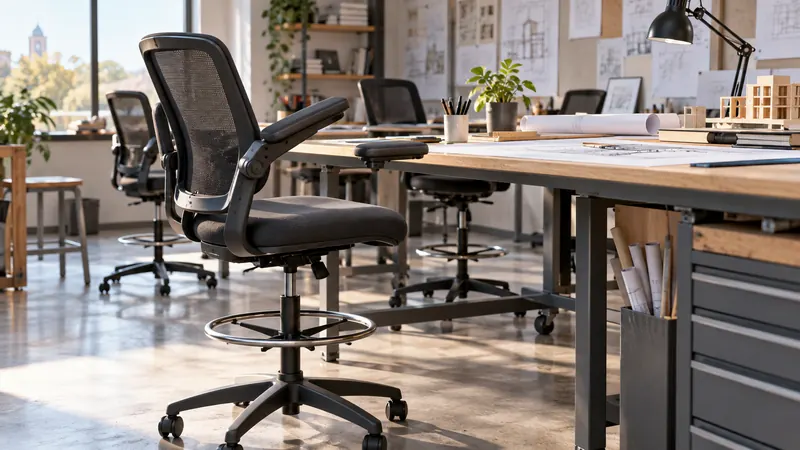
A drafting chair with flip-up arms has to solve a slightly awkward seating problem. The work surface may sit much higher than a normal desk, your feet need somewhere stable to rest, and the chair must still slide out of the way when a drawing, monitor, or tool takes priority. A standard office chair often leaves your knees too low, while a basic stool can make a long sketching session feel like a balancing act.
The most common mistake is choosing by armrest style alone. Seat-height range, foot-ring adjustment, lumbar support, seat cushioning, base stability, and clearance beneath the desk matter just as much. A compact studio may favor a chair that tucks away quickly, while someone working eight-hour shifts at a standing desk may prefer breathable mesh and more lumbar adjustment. Among the options compared here, the ErGear Drafting Chair offers the strongest overall mix of height range, foot support, flip-up arms, and back adjustability.
Some buyers will prioritize a wide, heavily cushioned seat, while others will care more about airflow, a 300-pound capacity, or a lower purchase range. The table below gives a quick way to sort those priorities before you settle into the detailed reviews.
Quick Answer
- Best overall: ErGear Drafting Chair with Footrest Ring and Flip-Up Arms for its 8-inch seat-height adjustment, adjustable lumbar support, broad foot ring, and breathable back.
- Best heavy-duty option: Drafting Chair with Flip-Up Arms, Tall Office Chair for Standing Desk for its listed 500-pound capacity and wide 19.88-inch cushion.
- Best for hot workspaces: Synorla Ergonomic Tall Drafting Chair with a breathable mesh back, adjustable lumbar support, and up to 9 inches of seat-height adjustment.
- Best budget pick: Sweetcrispy Tall Drafting Chair for its useful height range, footrest adjustment, lumbar storage basket, and lower price positioning.
Best Drafting Chairs With Flip Up Arms Comparison Table
| Product | Best For | Seat Height / Foot Ring | Arm Design |
|---|---|---|---|
| ErGear Drafting Chair | Overall adjustability | 8-inch seat range, 5-inch foot-ring range | 90-degree flip-up |
| Drafting Chair with Flip-Up Arms | Wide seat and higher capacity | 5.5-inch seat range, adjustable ring | 90-degree flip-up |
| Synorla Ergonomic Tall Drafting Chair | Breathable support | Up to 9-inch seat adjustment, repositionable footrest | Flip-up |
| Primy Drafting Chair | Long work sessions | Adjustable seat and foot ring | 90-degree flip-up |
| Ergonomic Drafting Chair for Standing Desk | Compact workspaces | 5.5-inch seat range, adjustable ring | 90-degree flip-up |
| ORRSAKER Drafting Chair | Artists and craft spaces | 7.9-inch seat range, locking ring | 90-degree flip-up |
| Sweetcrispy Tall Drafting Chair | Budget buyers | 23.43 to 29.33 inches, 8-inch footrest range | Flip-up |
| Marsail Drafting Chair with 2D Lumbar Support | Adjustable arm support | 7.9-inch seat range, locking ring | Flip-up, depth and swivel adjustment |
| Marsail Ergonomic Drafting Chair | Thick cushioning | 21.3 to 28.7 inches, 3.9-inch ring range | 0 to 75 degrees |
For a closer look at fit, materials, and everyday trade-offs, the reviews below show where each chair earns its place.
1. ErGear Drafting Chair with Footrest Ring and Flip-Up Arms – Best Overall
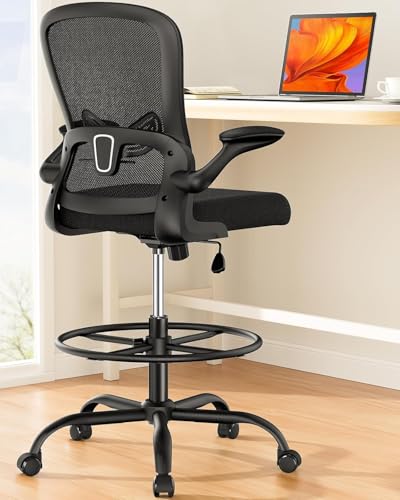
The ErGear stands out because its adjustment package addresses the parts of drafting-chair fit that usually cause the most fuss. The seat has an 8-inch height range, the foot ring adjusts through 5 inches, and the lumbar support moves through a 2-inch range. That combination gives buyers more room to match a tall desk, drafting table, or bar-height work surface without relying on a pile of cushions or an awkward footrest.
Its 19.7-inch foot ring gives both feet a defined resting place, which can feel far more natural than letting them dangle beneath a high desk. The listing also specifies a 17-degree mesh backrest, a thicker seat, flip-up padded arms, and support for up to 300 pounds. A student moving between a drafting table and a standing desk may appreciate the range, while a home studio user can flip the arms up and slide the chair closer to the work surface when the drawing takes over.
Pros
- 8-inch seat-height adjustment suits several elevated work surfaces.
- 5-inch adjustable foot ring provides useful leg support.
- 2-inch lumbar adjustment allows more precise back positioning.
- Breathable mesh back helps limit heat buildup.
- Flip-up arms, extra-large base, and heavy-duty casters support flexible use.
Cons
- The listed capacity is lower than the 500-pound rating of the wide-seat pick.
- Mesh and padded components may appeal less to buyers who prefer a fully upholstered chair.
This is the strongest fit for buyers who want one chair to cover drafting, computer work, and standing-desk use without giving up useful support adjustments. It may be more chair than necessary for occasional sketching, and the 300-pound rating should be checked against your needs before purchase. For most mixed workspaces, though, the height range and foot-ring design make it easier to dial in a comfortable position.
To buy this product, click here.
2. Drafting Chair with Flip-Up Arms, Tall Office Chair for Standing Desk – Best Heavy-Duty Option

A wide cushion changes the feel of a tall chair, especially for someone who shifts position while reading plans, checking a monitor, or reaching for supplies. This model lists a 19.88-inch seat with high-elastic foam and built-in pocket springs. That is a notable feature for buyers who dislike the narrow, stool-like feeling found on some drafting chairs, and the PU leather surface should be easy to wipe after a busy studio day.
The chair also lists a 5.5-inch seat adjustment, a height-adjustable foot ring, 360-degree swivel, rolling wheels, and a 500-pound support rating. Those figures make it appealing for reception desks, home offices, and creative workstations where the chair may need to turn between several surfaces. The arms flip up to 90 degrees, so the generous seat does not have to remain parked in front of the desk like a bulky lounge chair.
Pros
- 19.88-inch wide seat offers more room than many tall office chairs.
- Built-in pocket springs and high-elastic foam provide a distinctive cushioning design.
- Listed 500-pound capacity gives it the highest stated capacity in this roundup.
- Adjustable foot ring works with standing desks and counter-height surfaces.
- Wipe-clean PU upholstery suits reception areas and active studios.
Cons
- The 5.5-inch seat range is shorter than the 8-inch and 9-inch ranges offered by some competitors.
- PU upholstery may feel warmer than a full mesh back in a hot room.
Choose this chair when seat width and a higher listed capacity matter more than maximum adjustability. It suits people who want a substantial cushion beneath them during computer work, drafting, or reception tasks. Buyers who sit in a warm room or need highly adjustable lumbar support may prefer a mesh model instead, but anyone tired of cramped drafting stools will find the broader seat especially relevant.
To buy this product, click here.
3. Synorla Ergonomic Tall Drafting Chair – Best for Breathable Support

Warm studios can turn a long drawing session into a sticky, restless affair, so the Synorla earns attention with its breathable mesh back and 3-inch high-density foam seat. The listing also describes a wear-resistant 3D mesh back, which should appeal to buyers who want airflow behind the shoulders rather than a fully enclosed backrest. Designers, students, and office users can move between high drafting tables and ordinary desks because the chair is presented as suitable for both.
Its seat adjustment reaches up to 9 inches, while the footrest can be repositioned and the lumbar support can be adjusted. The pentagon base, metal frame, and quiet PU casters add practical mobility for a workstation where supplies, screens, and paper are spread around the room. Flip-up arms make it easier to pull close for keyboard work or clear the sides for broader drawing movements.
Pros
- Up to 9 inches of listed seat-height adjustment.
- Breathable 3D mesh back suits warm workspaces.
- Adjustable lumbar support helps personalize the backrest position.
- 3-inch high-density foam seat balances airflow with cushioning.
- Quiet PU casters and a pentagon base support mobile workstation use.
Cons
- The listing does not provide a specific weight capacity in the supplied details.
- Mesh construction may feel less plush than the thickest upholstered alternatives.
This model fits buyers who regularly spend long stretches at a drafting table and dislike the heat of leatherette upholstery. It is also a sensible match for a shared workspace because the broad height range can accommodate different desk setups. Skip it if a clearly stated load rating is a deciding factor, but keep it high on the list if airflow, lumbar adjustment, and a tall seat matter most.
To buy this product, click here.
4. Primy Drafting Chair – Best for Long Work Sessions

The Primy follows a familiar tall-office-chair layout, but its feature set is aimed squarely at extended sitting. It lists a curved backrest, adjustable lumbar support, a 3-inch seat cushion, and a breathable mesh back. The rounded foot ring gives the legs somewhere to settle beneath a standing desk, a useful detail for someone who alternates between typing, reviewing drawings, and reaching across a large work surface.
The chair swivels 360 degrees and rolls on casters, so it can serve at a drafting station, high desk, or counter-height work area. Its 90-degree flip-up arms are useful in a small room where every inch beneath the desk matters. The one-year warranty listed in the product information adds a defined support period, though buyers should still verify the current warranty terms and assembly details before ordering.
Pros
- Breathable mesh back is suited to longer seated periods.
- Curved backrest and adjustable lumbar support target posture-related comfort.
- 3-inch cushioned seat provides substantial padding.
- Adjustable foot ring supports elevated desk use.
- Flip-up arms and 360-degree movement improve workspace access.
Cons
- The listing does not specify the exact seat-height range.
- Its feature set is similar to several other mesh drafting chairs, so it has fewer distinctive specifications.
The Primy is a reasonable match for a home office or studio where a breathable chair and adjustable back support matter more than a specialized seat design. It may be less compelling for shoppers who need precise height figures before buying or who want the widest cushion available. Still, its balanced arrangement of foot support, airflow, and flip-up arms makes it practical for routine drafting and computer work.
To buy this product, click here.
5. Ergonomic Drafting Chair for Standing Desk – Best for Compact Workspaces

Some drafting chairs are used in rooms where the chair must vanish beneath the work surface between tasks. This model focuses on that routine with 90-degree flip-up arms, a 5.5-inch seat-height range, and a fully adjustable foot ring. A small studio worker can pull it close for detail work, flip the arms out of the way when standing, then tuck it beneath the desk without wrestling with fixed armrests.
The PU cover is described as stain-resistant and easy to wipe clean, while the reinforced steel base is intended for home offices, creative studios, reception areas, and workshops. Its 360-degree rolling mobility also suits spaces where the user pivots between monitors, shelves, and supplies. The supplied details do not give a precise capacity, so buyers with heavier-duty requirements should compare that point carefully with the chairs that list 300 or 500 pounds.
Pros
- Flip-up arms help the chair clear the desk when not occupied.
- 5.5-inch seat-height adjustment fits several tall work surfaces.
- Fully adjustable foot ring supports drafting and standing-desk use.
- Wipe-clean PU upholstery suits messy creative or workshop areas.
- 360-degree rolling movement helps with frequent repositioning.
Cons
- The supplied product information does not state a weight capacity.
- PU upholstery may retain more heat than breathable mesh.
This chair makes the most sense for buyers who need a practical, space-conscious workstation seat rather than a highly specialized ergonomic system. It is especially useful in a bedroom office, reception nook, or craft corner where the chair cannot remain in the aisle. Those who spend every day in the chair may prefer independently adjustable lumbar support and a stated capacity, but occasional and mixed-use buyers get a straightforward arrangement.
To buy this product, click here.
6. ORRSAKER Drafting Chair – Best for Artists and Craft Spaces

The ORRSAKER has a flexible personality that suits a studio where the chair may serve several jobs. Its listing describes a 7.9-inch height range, a locking adjustable foot ring, 2 inches of lumbar adjustment, and arms that flip up to create an armless-stool setup. That last feature is handy beside a craft table or guitar, where fixed arms can bump into the instrument or restrict broad elbow movement.
A dual-layer mesh back and 3-inch high-resilience foam seat aim to keep the chair cooler without turning it into a bare stool. The 300-pound listed capacity, thickened seat plate, five-claw base, and quiet PU casters give the product a clear position for home offices, lab benches, sewing areas, and art rooms. The supplied listing also states an estimated 15-minute assembly process, though actual assembly time can vary with tools and experience.
Pros
- 7.9-inch height adjustment fits a broad range of elevated desks.
- 2-inch lumbar adjustment adds useful back-position flexibility.
- Locking, anti-slip foot ring provides a defined leg-resting point.
- Arms flip up for craft, sewing, or instrument use.
- 300-pound capacity and quiet PU casters suit active workspaces.
Cons
- The X-shaped back design may feel less enveloping than a taller curved backrest.
- Its multi-use setup may be more than needed for a dedicated drafting station.
Pick the ORRSAKER if the chair needs to move between drafting, sewing, craft work, and other hands-on activities. The flip-up arms are more than a storage convenience here because they clear the sides when a project spreads outward. A buyer seeking a deeply cushioned executive chair may prefer the leather-style Marsail option, but artists who value flexibility will find this arrangement more natural.
To buy this product, click here.
7. Sweetcrispy Tall Drafting Chair – Best Budget Pick

The Sweetcrispy brings a useful collection of drafting-chair features into a lower price position. Its seat height is listed from 23.43 to 29.33 inches, and the footrest has an 8-inch adjustment range. That makes it suitable for many high desks and standing work surfaces, while the curved seat edge is intended to reduce pressure beneath the thighs when the chair is raised.
There is also a practical surprise behind the backrest. The lumbar support doubles as a storage basket, giving a student or home-office user a place for papers, files, or small supplies. The chair uses breathable mesh fabric, a metal base, 360-degree swivel, and a Class 3 gas cylinder with a listed 250-pound capacity. Those features are useful, but the lower capacity and simpler adjustment package distinguish it from the more robust selections above.
Pros
- Listed 23.43 to 29.33-inch seat range suits many high desks.
- 8-inch footrest adjustment offers useful positioning flexibility.
- Lumbar support doubles as a storage basket for small items.
- Waterfall-style seat edge is intended to reduce thigh pressure.
- Breathable mesh and 360-degree swivel support everyday office use.
Cons
- The listed 250-pound capacity is lower than several other options here.
- Class 3 gas-cylinder specifications may appeal less to buyers seeking heavier-duty hardware.
This is the pick for a student, occasional drafter, or home-office user who wants the essential tall-chair format without moving into a higher price tier. The storage basket is genuinely handy beside a drawing table, where rulers and loose sheets tend to wander. Buyers with a higher load requirement or demanding full-time use should look toward the ErGear, ORRSAKER, or Marsail alternatives instead.
To buy this product, click here.
8. Marsail Drafting Chair with 2D Lumbar Support – Best for Adjustable Arm Support

The Marsail earns its place with a more configurable armrest arrangement than many chairs in this category. The padded arms can move 1.96 inches in depth and swivel up to 15 degrees, then flip up when the chair needs to tuck away. That detail matters for keyboard work, technical drawing, and mouse-heavy tasks because arm support can be shifted without forcing the rest of the body into a fixed position.
The chair reaches a maximum seat height of 30.7 inches with a 7.9-inch adjustment range, and its foot ring locks at the selected height. A 3.15-inch foam seat, 2D lumbar support, breathable mesh back, and 300-pound listed capacity round out the design. It is a strong middle ground for someone who wants more upper-body adjustment than a basic drafting stool but does not need the widest seat in the group.
Pros
- 7.9-inch seat-height range reaches a listed maximum of 30.7 inches.
- 2D lumbar support allows more than one adjustment direction.
- Arms move in depth, swivel up to 15 degrees, and flip up.
- 3.15-inch foam seat provides substantial cushioning.
- Breathable mesh back and 300-pound capacity suit extended desk use.
Cons
- The armrest adjustment may be unnecessary for buyers who prefer simple fixed support.
- The listing does not state the exact foot-ring adjustment range.
This Marsail is best for a drafter who spends considerable time at a keyboard or control panel before returning to paper. The moving armrests can help the chair feel less restrictive during those repeated transitions. Someone who mainly wants a plush, leather-style seat may prefer the other Marsail model, while a compact-space buyer will appreciate the ability to flip the arms out of the way.
To buy this product, click here.
9. Marsail Ergonomic Drafting Chair – Best for Thick Cushioning

For buyers who prefer a softer, more upholstered seat, this Marsail uses a 3.5-inch cushion and soft brown leather-style fabric. The listing describes a triangular reinforced steel frame, scratch-resistant and waterproof upholstery, and stitching intended to support a more polished appearance. That combination may fit a home studio or office where a mesh chair feels too utilitarian and wipe-clean upholstery is useful.
The chair adjusts from 21.3 to 28.7 inches, and the foot ring has a 3.9-inch adjustment range. Its arms flip from 0 to 75 degrees, allowing the chair to slide beneath a desk and leaving the sides clear for creative work. The listed 330-pound capacity is higher than several mesh alternatives, though the seat-height range does not reach as high as the tallest options here.
Pros
- 3.5-inch cushion suits buyers who prefer a more padded seat.
- Listed 330-pound capacity supports a heavier-duty use case.
- Soft leather-style upholstery is described as waterproof and scratch-resistant.
- 21.3 to 28.7-inch seat range fits many tall desks.
- Flip-up arms and adjustable foot ring support flexible positioning.
Cons
- The 28.7-inch maximum seat height is lower than several mesh competitors.
- Leather-style upholstery may provide less airflow in warm rooms.
This is a good match for buyers who want the cushioned feel of a conventional office chair in a drafting-height format. It could work especially well in a home studio where the chair also needs to look presentable in a living space. Choose a mesh model instead if your room runs warm or your desk requires the highest possible seat position, but the thicker cushion and higher listed capacity give this chair a clear purpose.
To buy this product, click here.
Drafting Chair Buying Guide
A flip-up armrest is useful, but it should be the starting point rather than the entire buying decision. A chair can fold neatly beneath a desk and still feel wrong if the seat cannot rise high enough or the foot ring sits too low. Before ordering, measure the underside of the work surface, the distance from the floor to the top of the seat, and the clearance needed for your knees and armrests.
Match the Seat Height to the Work Surface
Drafting tables and standing desks vary considerably, so compare the chair’s stated seat range with your actual desk height. The ErGear offers an 8-inch adjustment range, while the Synorla lists up to 9 inches. A chair with a broad range gives you more flexibility, but the maximum figure matters most if your work surface is especially tall. Also check whether the foot ring can move independently, since raising the seat without raising the ring may leave your feet dangling.
Use the Foot Ring as Part of the Fit
A foot ring takes pressure off the backs of the legs and gives the feet a stable platform. Look for a ring that locks securely and has enough diameter for a natural stance. The ErGear lists a 19.7-inch ring and 5 inches of adjustment, while the Sweetcrispy lists an 8-inch footrest range. A ring that is technically adjustable but too narrow or too low will not solve much, so the mechanism and dimensions deserve attention.
Decide Between Mesh and Upholstery
Mesh backs allow more air to move behind the shoulders, which can be welcome in a warm studio or during a long computer session. The Synorla, Primy, ErGear, and Marsail 2D models all emphasize breathable back materials. PU or leather-style upholstery, such as the wide-seat chair and the second Marsail, is easier to wipe clean and can feel more padded, but it may retain more heat. Your room temperature, clothing, and preferred seat feel should guide this choice.
Check Lumbar and Arm Adjustability
Adjustable lumbar support is useful when two people share a chair or when your work shifts between drawing and typing. The ErGear lists 2 inches of lumbar movement, while the Marsail 2D model adds depth and swivel adjustment to its armrests. Fixed or lightly padded arms may be perfectly adequate for short sessions, but adjustable arms are more helpful when the chair must support a keyboard posture and a broader drawing posture in the same afternoon.
Leave Room for the Chair to Move
Measure the path around the desk, especially if the chair will roll between a drafting surface, printer, storage shelf, and monitor. Flip-up arms help with clearance, but they do not reduce the chair’s base diameter or the space needed to turn. Casters also behave differently on hard floors and mats, so a protective floor mat may be sensible for wood or delicate surfaces.
Read Capacity and Warranty Details Carefully
Several listings provide a stated capacity, including 250 pounds for the Sweetcrispy, 300 pounds for the ErGear, ORRSAKER, and Marsail 2D, 330 pounds for the leather-style Marsail, and 500 pounds for the wide-seat chair. Use those figures as a buying filter rather than a guarantee of comfort for every body type. Warranty language can also vary, and the supplied listings mention one-year coverage for some products, so check the current Amazon page for the exact terms before placing an order.
Best Drafting Chairs With Flip Up Arms FAQ
Are flip-up arms useful on a drafting chair?
Yes. They let the chair slide closer to a desk and create more side clearance for drawing, sewing, guitar practice, or other hands-on work. They are especially useful in compact rooms, though the hinge should still feel secure when the arms are lowered for support.
What height should a drafting chair be?
The correct height depends on the work surface. Set the seat so your forearms can reach the desk without shrugging your shoulders, then raise or lower the foot ring until your feet are supported. A chair with an 8- or 9-inch range gives more flexibility than one with a narrow adjustment span.
Do drafting chairs need a foot ring?
A foot ring is strongly useful for elevated desks because a normal office chair’s base will not support your feet at the same height. It can reduce the feeling of dangling legs and give you a stable position during drawing or typing. Buyers who use a separate foot platform may have less need for an integrated ring.
Are mesh drafting chairs better than leather-style chairs?
Neither material is universally better. Mesh usually allows more airflow, which helps in warm workspaces, while PU or leather-style upholstery can feel softer and wipe clean easily. Compare the seat cushion and back material separately, since a chair may combine a padded seat with a mesh back.
Can a drafting chair work at a standing desk?
Yes, provided the seat rises high enough for the desk and the foot ring can be positioned comfortably. Check the desk’s underside clearance as well. Flip-up arms are useful because they let the chair move closer when the user wants to alternate between sitting and standing.
What weight capacity should I look for?
Use the manufacturer’s stated capacity as a minimum reference and leave room for normal movement. The products in this guide list capacities from 250 to 500 pounds, but capacity alone does not describe seat width, cushioning, or long-session comfort. A wider cushion may be more meaningful than a higher number for some buyers.
How do I stop a drafting chair from feeling unstable?
Start by setting the foot ring so both feet rest evenly, then check that the chair is on a level surface and the base hardware is properly assembled. A broad base and locking foot ring can help the chair feel more planted. Avoid leaning heavily outside the chair’s center while reaching for supplies.
Final Verdict
The ErGear Drafting Chair is the strongest overall recommendation because it combines an 8-inch seat-height range, a 5-inch adjustable foot ring, 2-inch lumbar movement, breathable mesh, and flip-up arms. It has the adjustment depth needed for a workstation that shifts between drafting and computer use. The wide-seat chair is the better alternative for buyers who prioritize a 19.88-inch cushion and a higher listed capacity, while the Synorla makes more sense for a warm studio where airflow and a tall adjustment range lead the decision.
Budget shoppers should look closely at the Sweetcrispy, especially if the storage-basket feature and 250-pound capacity fit their needs. The Marsail leather-style chair is a more cushioned alternative, and the Marsail 2D model gives extra attention to arm and lumbar adjustment. Before ordering, measure your desk, confirm the required seat height, check the foot-ring position, and compare the listed capacity with your own needs. The chair that disappears neatly beneath the desk is convenient, but the chair that keeps your feet supported and your shoulders relaxed is the one you will appreciate after the drawing session runs long.
