A blueprint room can go from orderly to chaotic in minutes. One plan gets left across a worktable, another leans against a wall, and a third disappears beneath a stack of rolled drawings. Mobile blueprint racks solve that daily headache by keeping large-format documents upright, labeled, and ready to move between an office, studio, classroom, or jobsite.
The important differences are easy to miss in product listings. Some racks include clamps, while others provide only the frame and pivot brackets. Clamp width affects the documents you can organize, and height or depth adjustment matters if the rack will serve several people or hold mixed-size plans. Buyers also have different priorities. A contractor may need maximum capacity, while a small design office may care more about footprint, quick access, or the ability to add clamps later. The Adir 36-inch rack-and-clamp bundle stands out as the strongest overall match here because it combines a full set of clamps, adjustable storage, labeling, and mobile steel-and-aluminum construction.
For a quick look at the differences, the table below puts the nine selected racks side by side.
Best Mobile Blueprint Racks Comparison Table
| Product | Best For | Included Storage | Adjustment and Mobility |
|---|---|---|---|
| Adir 36-Inch Rack and Clamps | Best overall | 12 clamps, 36 inches | Height and depth adjustment, four casters, front brakes |
| VEVOR Rack With 12 Pivot Brackets | Budget rack-only setup | 12 pivot brackets, clamps not included | 42.5 to 61.4-inch height, 29.3 to 44.1-inch width |
| Kolldenn 24-Inch Rack With 6 Clamps | Compact mixed-size storage | Six 24-inch clamps | 38 to 53-inch height, 25 to 38-inch width |
| Adir Adjustable Mobile Rack | Custom clamp selection | Rack only, clamps sold separately | Height and depth adjustment, brakes |
| Adir 30-Inch Rack and Clamps | Full-size office organization | 12 clamps, 30 inches | Height and depth adjustment, four casters, front brakes |
| Adir Mobile Blueprint Holder | Flexible rack-only storage | Rack only, supports 30, 36, and 42-inch clamps | Height and depth adjustment, locking brakes |
| VEVOR Rack With 12 30-Inch Clamps | Large clamp capacity | 12 aluminum spring clamps, 30 inches | Expandable width, four wheels, two brakes |
| Estune Rack With 6 30-Inch Clamps | Tall adjustable storage | Six 30-inch hanging clamps | 48 to 66-inch height, 28.5 to 46.5-inch width |
| Thyle Rack With 12 Brackets | Bracket-style access | 12 swing brackets, clips not included | 46 to 66-inch height, 28.5 to 46.5-inch length |
The detailed reviews below show where each rack fits, what arrives in the package, and which trade-offs deserve attention before ordering.
1. Adir Blueprint Rack and Clamps, 12 Pack of 36-Inch Clamps – Best Overall

For a busy plan room, the biggest appeal of this Adir bundle is that it arrives as a complete storage system rather than an empty frame. The package includes a mobile rack and 12 aluminum blueprint clamps measuring 36 inches. That gives a contractor or architecture office a ready place for large construction plans, maps, posters, and drawing sets without having to source compatible clamps separately.
The listed steel-and-aluminum construction, adjustable height and depth, and four casters give the rack useful flexibility across different rooms. Each clamp also includes a snap-on plastic label holder, so a team can identify “electrical,” “site plans,” or “revisions” without pulling every sheet forward. The claimed capacity reaches up to 240 pounds or 1,200 documents, although actual capacity will depend on document thickness and how the clamps are loaded. For buyers who want broad compatibility and a full setup in one purchase, this is the most complete package in the group.
Pros
- Includes the rack and 12 36-inch blueprint clamps
- Steel and aluminum construction suits regular office or jobsite organization
- Height and depth adjustments accommodate different storage needs
- Four casters and front brakes support repositioning and parking
- Snap-on label holders make document groups easier to identify
Cons
- The 36-inch clamps may be more storage than needed for smaller drawings
- The full bundle takes more floor space than a compact six-clamp rack
This rack makes the most sense for a professional workspace that needs a complete, labeled system from the start. It is less compelling for someone who already owns compatible clamps or stores mostly small plans. Buyers comparing it with rack-only models should focus on the convenience of receiving 12 clamps, since that included hardware is a major part of the value.
To buy this product, click here.
2. VEVOR Mobile Blueprint Storage Rack With 12 Pivot Brackets – Best Rack-Only Value

The VEVOR rack is aimed at buyers who need the mobile frame and pivot-bracket layout but do not want a preselected set of clamps. Its 12 pivot brackets create separate positions for blueprint groups, posters, maps, or wrapping paper, while the adjustable height and width let the rack adapt to the room and the documents being stored.
The listing specifies a height range of 42.5 to 61.4 inches and a width range of 29.3 to 44.1 inches. That range is useful in a shared office where one person wants a lower browsing position and another prefers taller storage. The solid steel frame has a powder coating, and four swivel casters, including two lockable wheels, make it possible to roll the rack aside after a plan review. Since clamps are not included, the buyer must confirm that existing or separately purchased clamps fit the brackets.
Pros
- Includes 12 pivot brackets for organized document separation
- Adjustable height and width support different rooms and document groups
- Solid steel frame has a rust-resistant powder coating
- Four swivel casters make repositioning easier
- Rack-only format suits buyers who already own compatible clamps
Cons
- Clamps are not included
- Final setup cost and compatibility depend on the clamps purchased separately
This model works well for an office that already has a preferred clamp style or wants to build a system gradually. A new buyer who needs a ready-to-use rack may prefer one of the bundled options instead, since the separate clamp decision adds another step. Its broad adjustment range is the main reason to choose it over a fixed rack frame.
To buy this product, click here.
3. Kolldenn Mobile Blueprint Storage Rack With 6 24-Inch Clamps – Best Compact Bundle

A narrow plan room, school studio, or home office may have little patience for a large rack loaded with unused positions. The Kolldenn set takes a more compact route with six 24-inch aluminum alloy clamps and an iron rack. The smaller clamp format can be easier to place beside a desk or along a wall, particularly where documents do not require a 30- or 36-inch hanging span.
The rack adjusts from 38 to 53 inches in height and from 25 to 38 inches in width. That makes it a practical fit for mixed working positions, and the listing says the frame can hold up to 12 clamps if the owner expands the setup later. Clear label holders on the clamps help separate drawing categories, while four wheels and brakes allow the unit to move without becoming a loose obstacle in the room.
Pros
- Includes six 24-inch clamps instead of requiring a separate purchase
- Compact width range suits smaller offices and studios
- Adjustable height supports different users and storage arrangements
- Clear label holders help identify document groups
- Four wheels with brakes combine mobility and positioning
Cons
- 24-inch clamps provide less span than the larger bundled options
- Only six clamps are included, so high-volume offices may need more capacity
This is the rack to examine first if the phrase “mobile” matters as much as capacity. It gives a smaller workspace a complete starting setup without the visual bulk of a 12-clamp system. Buyers handling oversized construction sets should check the required clamp width before ordering, because compact storage becomes a limitation if the drawings extend beyond the supported format.
To buy this product, click here.
4. Adir Mobile Blueprint Storage Rack – Best for Custom Clamp Selection

This Adir frame is a useful choice for buyers who want control over the clamp size, color, and final configuration. The listing says it can be paired with 18-, 24-, 30-, 36-, or 42-inch file hanging clamps, though the clamps are sold separately. That flexibility can matter in an established office where several clamp sizes are already in circulation.
The solid steel rack includes height and depth adjustment, brakes, and a selection of color options including black, white, blue, red, and sand beige. The listing also states that assembly takes about 20 minutes with the included tools and manual. A California Proposition 65 warning appears in the product information, so buyers who need to review chemical disclosure details should read the manufacturer’s notice before purchase.
Pros
- Supports several clamp sizes, from 18 to 42 inches
- Solid steel construction provides a substantial storage frame
- Height and depth adjustment help accommodate different documents
- Available color choices suit different office layouts
- Brakes help keep the rack stationary during document access
Cons
- Clamps are sold separately
- Buyers must confirm compatibility and budget for the desired clamp size
This rack is a better fit for a buyer building around existing inventory than for someone starting from zero. It offers a broader configuration path than a fixed bundle, but that freedom comes with more purchasing decisions. Choose it when clamp flexibility matters more than receiving a complete document system in one package.
To buy this product, click here.
5. Adir Blueprint Rack and Clamps, 12 Pack of 30-Inch Clamps – Best Full-Size Value
The 30-inch Adir bundle follows the same complete-system approach as the top pick, but its clamp size sits between compact 24-inch storage and larger 36-inch plan organization. Twelve clamps give each project or document category its own position, which can make a busy construction office feel calmer without requiring stacks of flat files.
Its steel-and-aluminum build, adjustable height and depth, four casters, and front brakes give the rack a useful mix of structure and movement. Label holders are especially helpful when several revisions look nearly identical at a glance. The listing gives a capacity claim of up to 240 pounds or 1,200 documents, but buyers should treat that as a stated maximum rather than a promise that every document mix will reach the same result.
Pros
- Includes 12 30-inch clamps for a ready-to-use setup
- Middle-size clamp format suits many plan-storage needs
- Adjustable height and depth offer layout flexibility
- Front brakes help stabilize the four-caster base
- Label holders support fast identification of drawing groups
Cons
- The 30-inch format may not suit especially small or oversized plans
- The complete rack-and-clamp setup needs more floor space than a six-clamp unit
Choose this version for a general office that wants plenty of labeled positions without moving all the way to the 36-inch format. It is especially sensible for buyers who want the convenience of a complete package and expect to organize several active jobs at once. A compact studio may find the six-clamp Kolldenn easier to place.
To buy this product, click here.
6. Adir Mobile Blueprint Holder – Best Flexible Rack-Only Option
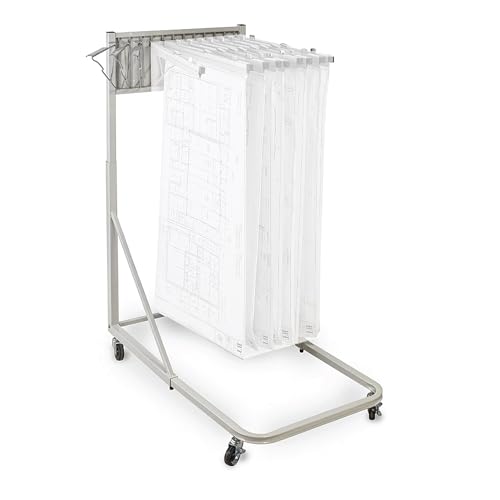
Some buyers need a dependable mobile frame but already know which clamps they want. This Adir holder is built for that situation. It is a solid steel rack that works with 30-, 36-, and 42-inch clamps, so an office can match the storage span to its drawing sets rather than accepting the size included in a bundle.
The rack is height and depth adjustable, includes brakes, and is presented for use with blueprints, maps, posters, drawings, and wrapping paper. Its claimed load capacity reaches 240 pounds or up to 1,200 documents when properly configured. Since the clamps are sold separately, the final setup depends heavily on the selected hardware and how many positions the buyer adds.
Pros
- Compatible with 30-, 36-, and 42-inch clamps
- Solid steel frame suits office and jobsite storage
- Height and depth adjustments support different document sizes
- Brakes help keep the rack in place during browsing
- Can organize blueprints, maps, posters, and other large documents
Cons
- Blueprint clamps are not included
- Less convenient for buyers who need a complete system immediately
This model earns its place through compatibility rather than package completeness. It is a smart route for a company standardizing on a particular clamp width or replacing a worn rack while retaining usable clamps. A first-time buyer should compare the cost and availability of the required clamps before choosing it over a bundled alternative.
To buy this product, click here.
7. VEVOR Blueprint Storage Rack With 12 30-Inch Aluminum Clamps – Best for Large Clamp Capacity

The VEVOR bundle is built around volume. It includes 12 30-inch aluminum spring clamps, so a design studio can separate active jobs, archived revisions, maps, or presentation sheets without buying a rack and clamps as separate pieces. The spring and lock-knob design is intended to keep documents in place, while the rack’s expandable width accommodates different storage arrangements.
The listing specifies a thickened steel frame with a rust-resistant coating and a stated total capacity of up to 220 pounds or about 1,200 sheets. Each clamp is listed for up to 20 pounds. Four wheels, including two with brakes, support movement from one office area to another. The useful distinction here is the included clamp quantity and 30-inch span, which may suit high-volume storage better than the six-clamp alternatives.
Pros
- Includes 12 30-inch aluminum spring clamps
- Steel frame has a rust-resistant coating
- Expandable design accommodates different document arrangements
- Four wheels and two brakes support movement and positioning
- Clamp springs and lock knobs are intended to secure document groups
Cons
- The stated capacity is lower than the 240-pound claim on several Adir models
- The 30-inch clamp format may not match every large-format plan set
This is a practical middle ground for teams that want 12 included clamps but do not need the 36-inch format. It suits a shared office where documents move often and clear separation matters. Buyers handling very wide sheets should compare clamp dimensions carefully instead of assuming that every “blueprint rack” supports the same plan size.
To buy this product, click here.
8. Estune Mobile Blueprint Holder Rack With 6 30-Inch Clamps – Best Tall Adjustable Option
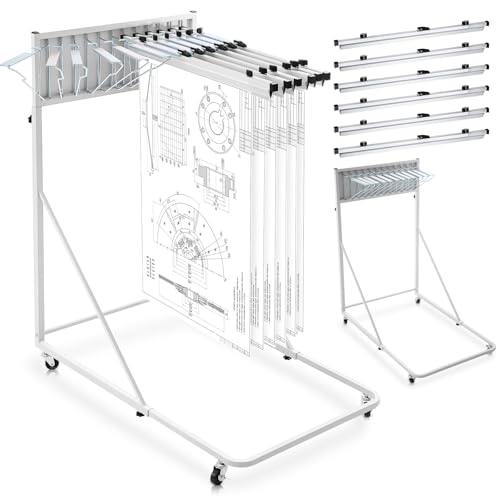
The Estune rack is aimed at buyers who want six wider clamps and a taller adjustment range. Its six 30-inch hanging clamps provide a useful amount of separation for active drawings, while the iron frame and coated surface give the unit a straightforward office-storage profile. The silver finish may also blend more easily into a bright studio than a darker industrial rack.
The listed height range runs from 48 to 66 inches, and the width adjusts from 28.5 to 46.5 inches. That taller range can help a shared workspace keep large documents accessible without forcing everyone to bend deeply over a low rack. Each clamp has a clear label holder, and the four-wheel base includes brakes. Buyers should remember that six positions offer less separation than the 12-clamp products, even though the rack can reportedly hold up to 12 clamps.
Pros
- Includes six 30-inch hanging clamps
- Tall 48 to 66-inch height range suits standing access
- Width adjusts from 28.5 to 46.5 inches
- Clear label holders help organize drawing categories
- Four wheels and brakes support mobile use
Cons
- Six included clamps provide fewer storage divisions than 12-clamp bundles
- The tall frame may be less suitable for low-clearance rooms or seated access
Consider this model for a standing-oriented plan room, presentation area, or studio where the rack needs to remain easy to browse from an upright position. It is less attractive for buyers whose priority is maximum document separation. Its appeal comes from the combination of 30-inch clamps and a generous height range.
To buy this product, click here.
9. Thyle Mobile Blueprint Storage Rack With 12 Brackets – Best Bracket-Style Setup

The Thyle rack takes a bracket-style approach for buyers who want 12 swinging positions and easy access to posters, maps, blueprints, or plans. The brackets swing wide, which can make it easier to browse a group of documents without lifting an entire stack. That style is particularly useful in a design classroom or office where several people need to look through plans during the day.
The steel rack adjusts from about 46 to 66 inches in height and from roughly 28.5 to 46.5 inches in length. Rolling wheels and stoppers help with movement and placement. Hanging clips are not included, so the rack should be viewed as a frame with brackets rather than a complete clamp-based storage bundle. That distinction is easy to overlook in a quick product search, yet it changes the setup process and final compatibility decision.
Pros
- Includes 12 swing brackets for separated document positions
- Wide-opening brackets can make browsing easier
- Height and length adjustments support different storage layouts
- Solid steel construction is suited to office or school storage
- Rolling wheels and stoppers support repositioning
Cons
- Hanging clips are not included
- Bracket storage may require more manual organization than labeled clamp bundles
This rack suits buyers who value accessible swing-out positions and already have a plan for the required clips. It may be less convenient for a contractor who wants every clamp and label included in one box. Compared with the bundled products above, its strongest advantage is the browsing layout rather than turnkey capacity.
To buy this product, click here.
Buying Guide For Mobile Blueprint Racks
Check the Clamp or Bracket Format First
The word “mobile” tells you how the rack moves, but the clamp or bracket format tells you how it stores documents. A 24-inch clamp may suit smaller plan sets, while 30- and 36-inch clamps give wider drawings more room. Rack-only products use pivot brackets or support points, so you must verify the clips you already own or plan to purchase.
Picture the daily workflow. If a project manager needs to pull one drawing from a labeled position several times a day, a clamp with a clear label holder can save repeated searching. If the rack is used for occasional poster display, swing brackets may provide faster browsing.
Decide Between a Complete Bundle and a Rack-Only Frame
Complete bundles such as the Adir and VEVOR clamp systems arrive with the main storage hardware included. That usually makes setup easier and gives the buyer a clearer idea of the rack’s intended use. Rack-only models can be the better route for an office that already has compatible clamps, but they shift the responsibility for fit, quantity, and total cost to the buyer.
Before selecting a rack-only model, count the clamps already in your workspace and measure their width. A frame that seems inexpensive can become less convenient if compatible clamps are difficult to source or if the existing hardware does not fit the bracket spacing.
Measure the Floor Area and Doorway Path
A mobile rack needs enough room to roll, turn, and stop without catching desks or doorframes. Width adjustment ranges reaching the mid-40-inch range can be useful for larger plan sets, but they also deserve a careful floor check. Measure the storage spot with nearby cabinets and tables in place, not in an empty room.
Think about the route between the plan room and the conference table. Four casters make movement possible, while front or dual-wheel brakes help hold the rack once it arrives. Mobility is useful only if the rack can travel through the spaces where the documents are actually needed.
Compare Height Adjustment With How People Work
A rack with a lower height range may be easier to browse from a seated position, while a taller frame can keep large drawings at a comfortable standing level. The listed ranges vary widely in this group. The Kolldenn reaches 53 inches, while the Estune and Thyle models extend to 66 inches.
Shared offices benefit from adjustable height because users may differ in stature and working style. A school studio may prefer a taller rack for standing review, while a home workspace with low shelves may need a shorter configuration.
Treat Capacity Claims as a Reference Point
Several listings cite storage capacities around 1,200 documents or load ratings above 200 pounds. Those figures provide a useful comparison point, but paper thickness, clamp spacing, and uneven loading affect real use. Rolled posters, thick plan sets, and heavily layered document groups will behave differently from lightweight individual sheets.
Leave room for active browsing rather than filling every position until the rack is difficult to move. A slightly less crowded rack can make revisions easier to find and reduce the temptation to pull several document groups out at once.
Look for Labels and Document Separation
Label holders may seem like a small detail until a rack contains several similar plan sets. Clear labels allow a team to mark project names, revision stages, disciplines, or client groups. The Adir, Kolldenn, and Estune bundles specifically include label holders, while bracket-style products may require a separate labeling method.
Simple organization has a physical payoff. A label visible from the aisle can prevent the familiar shuffle of paper, clips, and half-open plan sets across a crowded table.
Best Mobile Blueprint Racks FAQ
What Is A Mobile Blueprint Rack Used For?
A mobile blueprint rack stores large-format documents vertically or in hanging positions and allows the collection to move around a room. Common uses include construction plans, architectural drawings, engineering documents, maps, posters, and wrapping paper. The appropriate model depends on the document size and whether clamps are included.
Are Clamps Included With Every Mobile Blueprint Rack?
No. Several products in this roundup are rack-only models. The VEVOR pivot-bracket rack, the Adir rack-only products, and the Thyle model require separate clips or clamps. Bundles such as the Adir 36-inch, Adir 30-inch, Kolldenn, VEVOR 30-inch, and Estune racks include hanging hardware.
Which Clamp Size Should I Choose?
Match the clamp width to the documents you plan to store. The 24-inch Kolldenn format suits smaller plan groups, while 30-inch clamps provide a middle-ground layout. A 36-inch clamp gives more room for wider drawings. Measure the actual document sets before ordering rather than choosing based on the rack’s height alone.
Do Mobile Blueprint Racks Need Brakes?
Brakes are useful when documents are being inserted, removed, or reviewed. They help prevent the rack from rolling away while someone pulls a plan forward. The products here use different arrangements, including front brakes, two lockable casters, or wheel stoppers.
Can These Racks Store Posters And Maps?
Yes. The product listings describe several models as suitable for posters, maps, artwork, wrapping paper, and other large documents. Confirm that the clamp or bracket size matches the material, especially if the posters are wider or thicker than standard plan sheets.
Is A Rack-Only Model A Good Choice?
A rack-only model can be sensible if you already own compatible clamps or want to select a specific clamp size. It is less convenient for a first-time buyer who needs a complete setup immediately. Check compatibility, included brackets, and the cost of adding clamps before deciding.
How Much Floor Space Does A Mobile Blueprint Rack Need?
The exact footprint varies by model and adjustment position. Several racks expand into the upper-40-inch range in width or length, so measure the intended storage area with nearby furniture present. Also check the path through doorways and between workstations if the rack will move regularly.
Which Feature Matters Most For A Shared Office?
Adjustable height, clear labels, brakes, and enough separate clamp positions are especially useful in shared offices. Labels help identify projects quickly, while brakes make browsing safer. Buyers should also decide whether 6 or 12 storage positions better match the number of active drawing groups.
Final Verdict
The Adir 36-inch rack-and-clamp bundle is the strongest overall choice among these Best Mobile Blueprint Racks because it arrives as a complete system with 12 clamps, label holders, adjustable storage, and a mobile steel-and-aluminum frame. It is particularly well suited to architecture offices, contractors, engineers, and plan rooms that handle several large document groups at once. The 30-inch Adir bundle and the VEVOR rack with 12 30-inch clamps are meaningful alternatives for buyers who want broad capacity in a slightly smaller clamp format.
Smaller workspaces may prefer the Kolldenn rack with six 24-inch clamps, while buyers with existing hardware can look closely at the rack-only Adir or VEVOR options. The Estune is appealing for taller standing access, and the Thyle offers a bracket-style browsing layout. Before ordering, measure the documents, confirm clamp inclusion, check the floor path, and match the rack’s adjustment range to the people who will use it. A mobile rack earns its space when the documents remain easy to find, easy to move, and easy to return to the correct position.
