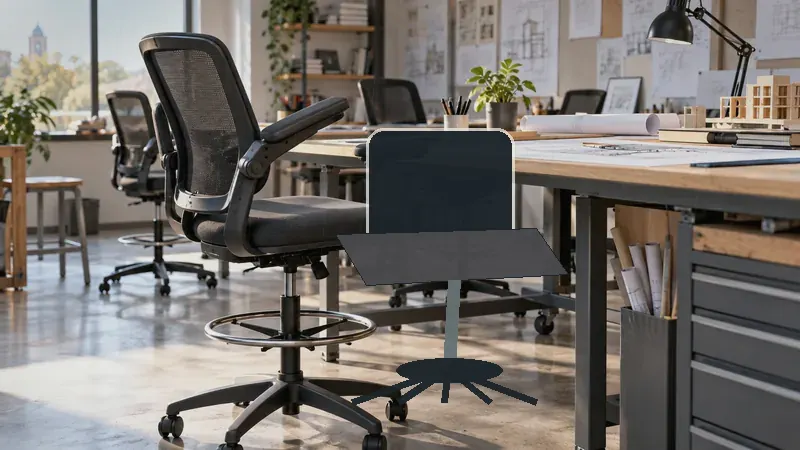
Architects often spend hours shifting between plans, monitors, sketches, and reference material, so a chair built for a standard desk may feel awkward at a tall drafting surface. The seat needs enough height to meet the worktop, a stable foot ring to keep the legs supported, and enough back support for long stretches of concentrated work. Small details, such as flip-up arms and quiet casters, can matter just as much in a compact studio as a large office.
The biggest buying error is matching a chair to its advertised height without checking how that height relates to the drafting table, standing desk, or counter-height workstation. Seat dimensions, lumbar adjustment, arm clearance, foot-ring position, weight capacity, and upholstery also separate these models. An architect working at a tall CAD station may prioritize adjustability and back support, while someone in a shared studio may care more about a compact footprint and arms that fold away. The Synorla offers the broadest blend of these traits among the selections below, while the BOLISS Big and Tall model is the more specialized answer for buyers who need a higher-capacity frame.
For a quick overview, the table below compares the nine selected chairs by their most useful drafting features.
Best Drafting Chairs for Architects: Quick Answer
- Best overall: Synorla Ergonomic Tall Drafting Chair, for adjustable lumbar support, a breathable back, flip-up arms, and flexible height adjustment.
- Best for larger users: BOLISS Big and Tall Drafting Chair, with a listed 400-pound capacity and high-back design.
- Best budget option: ORRSAKER Drafting Chair, with 300-pound capacity, adjustable lumbar support, and a foot ring.
- Best for neck support: FINATI Drafting Chair, which adds a high back and adjustable headrest.
- Best for compact rooms: Tall Executive Leather Drafting Chair, with flip-up arms that help it slide beneath a desk.
Best Drafting Chairs for Architects Comparison Table
| Product | Best For | Seat Height | Foot Support | Armrest Design |
|---|---|---|---|---|
| Synorla Ergonomic Tall Drafting Chair | Overall drafting use | Adjustable, up to 9 inches of added height | Repositionable footrest | Flip-up arms |
| BOLISS 400lbs Mid Back Chair | Wide-seat comfort | 23.6 to 31.5 inches | 24.016-inch foot ring | Fixed mid-back arm design |
| ORRSAKER Drafting Chair | Budget-conscious architects | Adjustable, 7.9-inch range | Adjustable locking foot ring | 90-degree flip-up arms |
| Tall Executive Leather Drafting Chair | Padded seating | Adjustable | Footrest ring | Flip-up arms |
| Primy Drafting Chair | Flexible home studios | Adjustable | Adjustable round ring | 90-degree flip-up arms |
| BOLISS Big and Tall Drafting Chair | Higher-capacity support | Fully adjustable | Adjustable metal foot ring | 90-degree flip-up arms |
| Perledesign Drafting Executive Chair | Value and traditional styling | 42.1 to 48.4 inches overall chair height | 2.17-inch adjustable ring | Padded flip-up arms |
| 400lbs Heavy-Duty Mesh Drafting Chair | Wide seating and capacity | 22.05 to 29.33 inches | Adjusts by 4.92 inches | 90-degree flip-up arms |
| PU Leather Drafting Chair | Wide foot support | 24.8 to 32.28 inches | 21.65-inch adjustable ring | Flip-up arms |
The detailed reviews below show how each chair’s height, support system, materials, and workspace clearance translate to architectural work.
1. Synorla Ergonomic Tall Drafting Chair: Best Overall

The Synorla earns the top position because its feature set fits the varied rhythm of architectural work. An architect may spend one hour reviewing drawings at a raised surface, then lower the workstation or move to a conventional desk for email and documentation. The chair is listed with up to 9 inches of seat-height adjustment, flip-up armrests, and a repositionable footrest, giving it more flexibility than a fixed-height drafting stool.
Its support package is equally practical for long desk sessions. The adjustable lumbar support can be positioned to suit the user, while the 3D mesh back allows airflow during warm afternoons. A 3-inch high-density foam cushion adds padding beneath the seat, and PU casters are listed for quiet movement across floors. That combination makes the chair a sensible fit for architects who need one chair to serve a drafting station and a standard office setup, though buyers should still match the height range to their specific work surface.
Pros
- Seat height adjusts by up to 9 inches for elevated and standard desks.
- Adjustable lumbar support helps users personalize lower-back positioning.
- Breathable 3D mesh back suits warm studios and extended sitting.
- Flip-up arms make it easier to clear the desk or change posture.
- Repositionable footrest and quiet PU casters support flexible workspace use.
Cons
- The listing does not provide a specific seat-height range or seat-width measurement.
- Buyers who prefer a cushioned high back may favor one of the high-back alternatives.
Choose the Synorla if your workstation changes throughout the day and you want a breathable chair with several useful adjustments. It is especially well matched to architects working between CAD, paper plans, and general office tasks. A buyer seeking a very wide seat or a documented 400-pound capacity should look toward the BOLISS models instead. For a mixed-use studio, though, the Synorla’s balance of mobility, height, arms, and lumbar adjustment is difficult to ignore.
To buy this product, click here.
2. BOLISS 400lbs Mid Back Mesh Ergonomic Drafting Office Chair: Best for Wide Seating

The BOLISS 400lbs Mid Back model focuses on generous seating and leg support. Its listed seat height runs from 23.6 to 31.5 inches, a range that places it firmly in drafting-chair territory for many elevated surfaces. The 24.016-inch foot ring is wider than the seat, according to the listing, which may feel useful for an architect who shifts foot position while reviewing a large plan or rotating between monitors.
The seat uses high-density molded foam with breathable upholstery, while the 18.9-inch seat depth gives the chair a more substantial sitting platform. Its wide-seat layout can be appealing in a shared office where people have different builds, but the mid-back format offers less upper-body coverage than the tall high-back options below. The listed two-year after-sales service adds some reassurance for buyers equipping a dedicated workstation, provided the chair’s dimensions suit the user and desk.
Pros
- Listed seat-height range of 23.6 to 31.5 inches suits many elevated work surfaces.
- Wide seat provides more room for movement than a narrow drafting stool.
- Large 24.016-inch foot ring gives the legs a broad support area.
- High-density molded foam is intended for extended sitting.
- Listed 400-pound capacity provides a higher support rating than several alternatives.
Cons
- The mid-back design provides less neck and upper-back coverage than a high-back chair.
- Its larger seating proportions may feel excessive in a very compact studio.
This BOLISS makes sense for architects who value a roomy seat and broad foot support over a compact silhouette. It can be particularly useful at a fixed-height drafting desk where the chair will remain in one position. Buyers who regularly slide a chair beneath a shallow desk or need head and shoulder support may prefer the FINATI or BOLISS Big and Tall model. The main attraction here is clear, generous seating rather than a long list of fine adjustments.
To buy this product, click here.
3. ORRSAKER Drafting Chair: Best Budget Option

The ORRSAKER is aimed at buyers who want the basic architecture-studio essentials without moving into a larger or more specialized chair. Its listing specifies a 7.9-inch height adjustment, a 2-inch height-adjustable lumbar support, an adjustable foot ring, and a 300-pound capacity. Those features give a student architect, home-office drafter, or first-time studio buyer a useful starting point for a raised desk.
The chair’s X-shaped backrest and dual-layer mesh are paired with 3-inch high-resilience foam. Its 90-degree flip-up arms can turn the chair into a more open seating position, which is handy when an architect needs to move freely between a keyboard, a physical model, and a drawing surface. The listing also describes quiet PU casters and assembly in about 15 minutes. Buyers should treat that assembly estimate as a product claim rather than a guarantee, but the overall configuration remains refreshingly straightforward.
Pros
- 7.9-inch height adjustment accommodates many high desks and craft tables.
- Adjustable lumbar support can be moved to suit different users.
- Flip-up arms save clearance and allow more open movement.
- Breathable dual-layer mesh and 3-inch foam support warm, long work sessions.
- Listed 300-pound capacity and quiet PU casters suit everyday studio use.
Cons
- Its 300-pound listed capacity is lower than the two 400-pound BOLISS options.
- The X-shaped mid-back provides less upper-body coverage than a high-back design.
The ORRSAKER is a sensible pick for an architect setting up a home office, school workspace, or secondary drafting station. It has the adjustments that matter most without the bulk of a big-and-tall chair. Someone who needs a very wide seat, a headrest, or a higher support rating should spend more on another model. For a lean, affordable setup where the chair may also serve at a craft table, the flip-up arms are a particularly useful touch.
To buy this product, click here.
4. Tall Executive Leather Drafting Chair: Best for Padded Seating
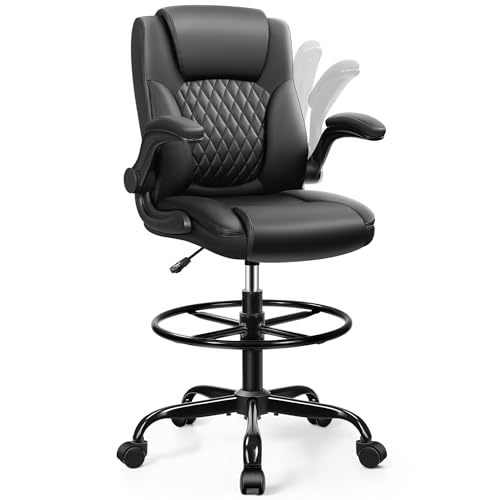
Some studios call for a chair that feels more like an executive seat than a mesh drafting stool. This tall black chair uses a padded seat and backrest with a soft natural sponge, giving it a warmer, more cushioned presentation for architects who dislike the firmer feel of open mesh. Its adjustable height and footrest ring are intended for standing desks, drafting tables, and counter-height workstations.
The design is also attentive to tight rooms. Flip-up armrests allow the chair to slide beneath a desk, while the listing gives an assembly estimate of 15 to 25 minutes. A listed 250-pound capacity places it below the other chairs in this roundup, so capacity should be checked carefully before purchase. For a compact home office where appearance, padding, and under-desk storage matter more than a high support rating, its trade-offs may be acceptable.
Pros
- Padded seat and backrest offer a softer alternative to mesh-heavy designs.
- Adjustable height suits drafting tables and elevated office surfaces.
- Footrest ring supports the legs at a raised sitting position.
- Flip-up armrests help the chair clear a desk in a small room.
- Its executive styling fits home offices and multipurpose studios.
Cons
- The listed 250-pound capacity is lower than every other chair selected here.
- Padded upholstery may feel warmer than a breathable mesh back during hot work sessions.
This model fits an architect who wants a plush, visually polished chair for a home studio or shared room. It is less suitable for buyers who need a high weight rating, a documented lumbar adjustment, or maximum airflow. The decision comes down to atmosphere and seating feel: choose this chair for padded comfort and compact clearance, while the Synorla or ORRSAKER offers more clearly documented ergonomic adjustment.
To buy this product, click here.
5. Primy Drafting Chair: Best for Flexible Home Studios

The Primy has the adaptable, multipurpose character that suits a home studio where one chair may serve a drafting table in the morning and a regular desk or counter later. Its adjustable footrest, 90-degree flip-up armrests, curved backrest, and lumbar support give the user several ways to set up the seat around a raised surface. The round foot ring is especially relevant for architects who dislike letting their feet dangle from a tall chair.
A breathable mesh back is paired with a 3-inch streamlined cushion and high-density foam. That pairing should appeal to buyers who want some padding without a fully enclosed backrest. The five-claw base and 360-degree swivel support ordinary workspace movement, while the listing states a one-year warranty. Since the product information does not provide a specific seat-height range or capacity, shoppers with an unusually tall table or particular load requirement should verify those details before ordering.
Pros
- Adjustable footrest supports different desk heights and leg positions.
- Flip-up arms make the chair easier to use in multipurpose rooms.
- Curved backrest includes adjustable lumbar support.
- Breathable mesh and 3-inch cushion balance airflow with padding.
- Five-claw base and swivel casters support mobile desk work.
Cons
- The supplied listing does not state a specific seat-height range.
- The one-year warranty is shorter than the two-year service listed for the BOLISS mid-back model.
Pick the Primy if your workspace changes often and you want a conventional-looking office chair with drafting height features. It is a more natural fit for a flexible home office than a dedicated commercial drafting room. Buyers who need precise height planning should first measure the gap between the seat and desktop, since the supplied product information leaves the exact range unspecified. Its strongest advantage is practical versatility rather than heavy-duty specialization.
To buy this product, click here.
6. BOLISS Big and Tall Drafting Chair: Best for Higher-Capacity Support

The BOLISS Big and Tall chair is the specialized choice for architects who need more room and a higher listed capacity. Its reinforced metal base and Class 4 gas lift are specified for up to 400 pounds, while the high-back design provides more torso coverage than the mid-back models. A dual-layer seat cushion adds thickness beneath the user, an appealing detail for long sessions spent reviewing plans or working at a standing desk.
Its adjustable metal foot ring and flip-up padded arms keep the chair practical rather than purely oversized. The arms can move out of the way when an architect needs to turn toward a model or slide the chair closer to a desk. The trade-off is physical presence. A high-back, big-and-tall chair naturally demands more visual and floor space, so it may feel excessive in a narrow apartment office even though its support features are compelling.
Pros
- Listed 400-pound capacity supports buyers seeking a higher-rated chair.
- High-back design gives more back coverage than mid-back alternatives.
- Dual-layer seat cushion is intended for extended sitting comfort.
- Adjustable metal foot ring helps support the legs at drafting height.
- Flip-up padded arms improve desk clearance and movement.
Cons
- The larger high-back structure may occupy more space in a compact studio.
- Its more specialized build may be unnecessary for smaller users or occasional drafting.
This is the chair to examine first if capacity, seat cushioning, and back coverage sit at the top of your list. It is also a sensible fit for a fixed architectural workstation where the chair can remain fully set up. A small-space buyer or someone who frequently moves between rooms may prefer the ORRSAKER or Perledesign. The BOLISS Big and Tall earns its position through support-focused construction, not minimal size.
To buy this product, click here.
7. Perledesign Drafting Executive Chair: Best Value Styling

The Perledesign brings a vintage brown faux-leather look to a category dominated by black mesh. Its overall chair-height range is listed as 42.1 to 48.4 inches, and the foot ring adjusts by 2.17 inches. That combination makes it suitable for tall worktables and standing desks while giving a home office a warmer, more furniture-like appearance.
Its mid-back has targeted lumbar cushioning and full padding, while the seat uses 10 centimeters of foam according to the listing. Padded armrests flip upward, which helps the chair fit beneath narrow desks. The product information also states a 300-pound capacity and describes swivel and caster cycle tests. Those claims are useful context, but they do not replace checking the exact dimensions of the work area. The faux-leather surface may also feel warmer than mesh during a long summer afternoon.
Pros
- Distinctive vintage brown styling suits home offices and visible studio spaces.
- Listed 42.1 to 48.4-inch overall height fits many elevated workstations.
- Thick foam seat provides a padded sitting surface.
- Flip-up padded arms help with narrow desk clearance.
- Listed 300-pound capacity and five-wheel base support routine office movement.
Cons
- Faux-leather upholstery may provide less airflow than mesh designs.
- The mid-back format gives less upper-body coverage than the high-back chairs.
Perledesign is a strong match for an architect who wants a drafting chair that looks at home beside bookshelves, a wood desk, or a client-facing workspace. It is less compelling for hot studios or buyers who prefer mesh and extensive adjustment points. The chair’s appeal is the blend of tall seating, thick padding, and furniture-style appearance, especially for a home office where the drafting chair remains visible all day.
To buy this product, click here.
8. 400lbs Heavy-Duty Mesh Drafting Chair: Best for Wide Seating and Airflow

This heavy-duty model combines a wide chair format with a breathable mesh back and a substantial 3.15-inch seat cushion. Its listed seat-height range is 22.05 to 29.33 inches, and the footrest adjusts by 4.92 inches. That makes the chair useful for architects who need to align the seat with several work surfaces but still want a broad leg-support range.
The chair includes a height-adjustable lumbar pad, 90-degree flip-up arms, and a metal base with a Class 4 gas lift. The listing states support up to 400 pounds and references BIFMA and SGS standards. Those are meaningful listed details for buyers comparing capacity and construction, although individual fit still depends on seat width, desk height, and posture. The PU leather seat should be easy to wipe clean, while the mesh back helps release heat around the shoulders.
Pros
- Listed 400-pound capacity suits buyers seeking a higher support rating.
- 22.05 to 29.33-inch seat-height range covers many drafting setups.
- Footrest adjusts by 4.92 inches for more flexible leg positioning.
- Breathable mesh back and adjustable lumbar pad support warm, long sessions.
- Flip-up arms and wipe-clean PU leather seat suit active studio spaces.
Cons
- The seat height does not reach as high as the BOLISS mid-back or PU leather wide-ring model.
- A wide heavy-duty frame can be less visually discreet in a small home office.
Architects who want a broad seat, high listed capacity, and cooler back support should place this model near the top of their shortlist. It is particularly suitable for a dedicated drafting station where the seat-height range matches the desk. Buyers with very tall work surfaces should compare its maximum height carefully before choosing it. Its strongest selling point is the combination of capacity and airflow, a pairing that many compact drafting chairs do not emphasize.
To buy this product, click here.
9. PU Leather Drafting Chair with Wide Footrest: Best for Elevated Work Surfaces

The standout feature here is the 21.65-inch footrest ring. The listing describes it as wider than the foot rings on other drafting chairs, giving the feet more room to shift and settle. That is useful for architects who work at a tall desk and dislike the cramped feeling of a narrow support ring. The seat height runs from 24.8 to 32.28 inches, placing this chair among the taller options in the roundup.
A 5.2-inch 3D modeling foam seat with a PU leather surface provides substantial cushioning, while the mesh back adds airflow around the upper body. The chair also includes 1.2 inches of adjustable lumbar movement, flip-up arms, a 5.5-inch adjustable footrest position, and a listed 300-pound capacity. Its height and broad foot support are attractive, but the large ring needs enough clearance beneath the drafting table. Measure the space around the chair base before ordering, especially in a crowded studio.
Pros
- 24.8 to 32.28-inch seat-height range suits taller drafting surfaces.
- 21.65-inch footrest ring provides a broad area for foot support.
- 5.2-inch foam seat offers substantial cushioning for long sessions.
- Adjustable lumbar support and breathable mesh back address two common comfort needs.
- Flip-up arms and 360-degree swivel support active architectural workspaces.
Cons
- The wider foot ring requires sufficient clearance beneath the work surface.
- Its 300-pound listed capacity is lower than the two 400-pound models.
This chair suits an architect whose drafting surface sits high and whose feet need more room than a conventional ring provides. It is also appealing for users who prefer a thick upholstered seat rather than a slimmer cushion. Skip it for a cramped workstation where the wide ring could interfere with drawers or table supports. Among the selections here, it offers one of the clearest answers to the simple problem of keeping the feet comfortable at a tall desk.
To buy this product, click here.
Drafting Chair Buying Guide for Architects
Match the Seat Height to the Work Surface
Measure the distance from the floor to the top of the drafting surface, then check where your elbows and forearms land while seated. A chair that reaches the desk but leaves the shoulders raised can create an awkward working posture. The Synorla adds up to 9 inches of height, the ORRSAKER offers a 7.9-inch adjustment range, and the PU Leather Drafting Chair reaches a listed 32.28-inch seat height. Those numbers are useful starting points, but the correct choice depends on your own desk and body proportions.
Architects who move between a drafting table and a conventional desk should favor a broad adjustment range. Someone using one fixed-height plan table may prefer a chair with a simpler mechanism and a foot ring positioned exactly where the legs need it.
Give the Feet a Stable Rest
A foot ring keeps the legs supported when the seat is higher than a standard office chair. A narrow ring may suit one user, while a wide ring gives another more freedom to shift position during a long drawing session. The BOLISS mid-back chair lists a 24.016-inch ring, and the PU Leather Drafting Chair lists a 21.65-inch ring. Adjustable rings are especially useful when several people share the workstation.
Check clearance beneath the drafting table before choosing a large ring. Table legs, drawers, and crossbars can interfere with the chair base or foot support, producing a setup that looks suitable on paper but feels cramped in the room.
Choose Back Support for the Work Pattern
Mid-back chairs can feel open and less bulky, which may help when an architect frequently turns toward models, shelves, or a second desk. High-back chairs provide more coverage for the torso and may feel more reassuring during long seated periods. The BOLISS Big and Tall chair and FINATI both take the high-back route, while the Synorla, ORRSAKER, and Primy emphasize adjustable lumbar support within more compact silhouettes.
Lumbar adjustment is useful because a fixed cushion may sit too high or too low for a particular user. It does not guarantee comfort for every body shape, so seat depth, back height, and the ability to sit close to the desk remain relevant.
Think Carefully About Armrests
Flip-up arms are practical in architectural studios because they clear the desk when you need to pull close to a drawing, reach a model, or slide the chair away. They also help a chair fit beneath a work surface after hours. The Synorla, ORRSAKER, Primy, BOLISS Big and Tall, and the two later tall-chair designs all use flip-up arms.
Fixed arms can still work well if the desk has enough clearance and the user prefers consistent elbow support. Before purchasing, measure the underside of the desk and check whether the armrests will pass beneath it at the intended seat height.
Balance Mesh, Foam, and Upholstery
Mesh backs allow more airflow around the shoulders and spine, a welcome trait in a warm studio or a room with equipment running for hours. Foam seats provide padding, but their shape and thickness affect how close you can sit to the work surface. The Synorla combines a mesh back with 3-inch foam, while the PU Leather Drafting Chair lists a 5.2-inch foam seat and a mesh back.
Fully padded or faux-leather chairs may feel warmer and more traditional. They can also suit a home office where appearance matters. Fabric, foam, and leather-like surfaces should be judged alongside ventilation, cleaning needs, and the amount of time spent seated.
Check Capacity and Physical Proportions
Capacity is a verified specification worth taking seriously, but it is only one part of fit. The BOLISS mid-back and the heavy-duty mesh model list 400-pound capacities. The ORRSAKER, Perledesign, PU Leather, and FINATI models list 300 pounds, while the tall executive leather chair lists 250 pounds.
Seat width, depth, back height, and foot-ring placement can matter just as much. A chair may carry the right capacity yet feel too narrow, or it may have a roomy seat but lack the height required by a tall workstation. Compare the full dimensions with the room and desk before relying on a single number.
Plan for Movement Around the Studio
Quiet casters and a stable five-wheel base make it easier to shift between a monitor, drawing surface, and reference shelf. Smooth movement is useful, but the floor type still matters. Buyers with wood, vinyl, or delicate flooring should check the caster material and consider a suitable floor mat if needed.
Also measure the path around the chair. A big-and-tall model may work beautifully at the primary station but make a narrow aisle feel crowded. Smaller chairs such as the ORRSAKER or Synorla can be easier to live with in a bedroom office or shared studio.
Best Drafting Chairs for Architects FAQ
What makes a chair suitable for an architect’s drafting desk?
A suitable drafting chair reaches the height of the work surface, supports the legs with a foot ring, and allows the user to work close to plans or monitors. Adjustable lumbar support, breathable materials, and flip-up arms are useful for long sessions and changing tasks.
How high should a drafting chair be?
The correct height depends on the drafting table, desk, and the user’s seated posture. Measure the work surface and select a chair whose seat-height range places the elbows comfortably near the desk without lifting the shoulders. Tall chairs in this roundup reach into the low-30-inch seat-height range, while others offer a smaller adjustment range.
Are flip-up arms useful for architectural work?
Yes. Flip-up arms can clear the edge of a drafting table, let the user move closer to a plan, and help the chair slide under a desk. They are especially useful in compact rooms or workspaces that alternate between computer work and physical models.
Is a high-back chair better than a mid-back drafting chair?
Neither style suits every architect. A high back provides more torso coverage and may appeal to users who sit for long periods. A mid-back chair takes up less visual space and may make turning toward models or storage easier. Choose according to your work pattern, desk clearance, and preferred support.
Do architects need an adjustable foot ring?
An adjustable ring is helpful when the chair is shared, the desk height changes, or the user wants to vary leg position. A fixed or less adjustable ring can still work well at a dedicated drafting table if its position supports the feet comfortably.
Are mesh drafting chairs comfortable for long CAD sessions?
Mesh can improve airflow around the back, while the seat cushion determines much of the under-body comfort. Look for a chair that combines a supportive cushion with lumbar adjustment and a foot ring. Mesh does not automatically make a chair comfortable, so seat shape and fit remain important.
What capacity should an architectural drafting chair have?
Choose a listed capacity that comfortably exceeds the user’s weight, then review seat width, depth, and height as well. The 400-pound BOLISS models offer the highest listed capacities in this selection, while several others list 300 pounds. The chair’s overall proportions still need to match the user.
Can a drafting chair replace a standing desk?
No. A drafting chair supports seated work at an elevated surface, while a standing desk allows work while standing. Some chairs can pair with adjustable desks and make it easier to alternate between sitting and standing, but they do not provide the same posture or movement experience as standing without a chair.
Final Verdict
The Synorla Ergonomic Tall Drafting Chair is the strongest overall match for architects who want one chair to cover drafting, CAD, and ordinary office work. Its listed height adjustment, repositionable footrest, flip-up arms, adjustable lumbar support, breathable mesh back, and 3-inch cushion create a well-rounded package. The ORRSAKER is the more budget-conscious alternative, while the BOLISS Big and Tall chair is the better direction for buyers who need a high-back frame and a listed 400-pound capacity.
Different studios call for different compromises. Choose the PU Leather Drafting Chair if a broad foot ring and taller seat range matter most, the FINATI if head and neck support are priorities, or the Perledesign if a warmer executive appearance suits your home office. Before ordering, measure the drafting surface, check the chair’s seat-height range, confirm clearance beneath the desk, and compare the listed capacity with the user’s needs. Those few measurements can turn a chair that looks good in a product image into one that genuinely fits the daily rhythm of architectural work.
