A drafting chair can look perfectly fine in a product photo, then feel awkward the moment your work surface rises above a standard desk. Your knees may sit too low, your feet may dangle, or the chair may roll away while you reach for a scale or sketchbook. That is why buyers searching for the best ergonomic drafting chairs usually need more than a tall seat. Seat-height range, foot-ring placement, lower-back support, armrest clearance, and base stability all shape how comfortably a chair fits an elevated workstation.
The details are easy to mix up. A chair with a high maximum seat height may still be a poor match if its foot ring cannot move independently, while a thick cushion does little for posture if the backrest lacks useful support. Some buyers need a wide, heavy-duty seat for long studio sessions. Others want a compact chair that tucks beneath a standing desk, or a breathable mesh back for a warm home office. Among the options below, the BOLISS high-back chair stands out as the strongest overall fit because it combines a stated 24.8 to 32.1-inch seat-height range, adjustable lumbar support, a headrest, a waterfall seat edge, and a 400-pound capacity.
Before choosing, measure the underside of your desk, the height of its work surface, and the clearance around the chair. Your ideal pick may be a budget model with a broad adjustment range, a mid-priced chair with better lower-back positioning, or a heavier design built for extended use.
For a quick scan, the table below compares the nine selected chairs by height, support features, and intended use.
Best Ergonomic Drafting Chairs Comparison Table
| Product | Best For | Seat Height | Foot Ring | Support Features |
|---|---|---|---|---|
| BOLISS Drafting Tall Office Chair | Best overall | 24.8 to 32.1 in. | Oversized, included | Adjustable lumbar support, 3D headrest |
| Ergonomic Drafting Chair, Tall Office Chair | Best budget fit | 5.5-in. adjustment range | Adjustable | Padded flip-up arms |
| Synorla Ergonomic Tall Drafting Chair | Best height flexibility | Up to 9 in. of adjustment | Repositionable | Adjustable lumbar support |
| 400 lb Heavy-Duty Wide Drafting Chair | Best wide-seat option | 22.05 to 29.33 in. | Adjusts 4.92 in. | S-shaped back, adjustable lumbar pad |
| BOLISS 400 lb Ergonomic Drafting Chair | Best premium support | Extended range | Included | Adjustable headrest, mesh back |
| BOLISS 400 lb Mid-Back Chair | Best for broad seating | 23.6 to 31.5 in. | 24.016-in. ring | Wide seat, molded foam |
| SONGMICS Drafting Chair | Best affordable compact pick | 7.9-in. adjustment range | Adjustable | Lumbar pad, waterfall edge |
| ErGear Drafting Chair | Best for desk versatility | 8-in. adjustment range | 19.7-in. ring, adjusts 5 in. | Adjustable lumbar support |
| AtHope Drafting Chair | Best head and lumbar adjustability | 22.8 to 30.7 in. | Adjustable | 3D lumbar support, 3D headrest |
The detailed reviews explain where each chair fits best, along with the trade-offs that may matter at a drafting table or standing desk.
1. BOLISS Drafting Tall Office Chair 400lbs High Back Standing Desk Chair , Best Overall

The strongest feature here is the height range. The listing specifies a 24.8 to 32.1-inch seat-height range, giving this chair more room to pair with elevated drafting tables, standing desks, kitchen islands, or bar-height surfaces. Someone moving between a conventional desk and a high workbench may appreciate that extra reach, especially when a shorter chair leaves the forearms angled upward toward the desktop.
Support is unusually complete for this group. The chair includes a 3D adjustable headrest with four adjustment levels, an adjustable lumbar cushion, a four-inch molded foam seat, and a waterfall front edge intended to reduce pressure behind the knees. Its breathable nylon mesh back may suit warm studios, while the 400-pound stated capacity and oversized foot ring give the design a more substantial profile. The flip-up arms are handy in a compact apartment, although the broad frame still deserves careful floor-space planning.
Pros
- 24.8 to 32.1-inch stated seat-height range
- Adjustable lumbar cushion and four-level 3D headrest
- Four-inch molded foam seat with waterfall front edge
- 400-pound stated weight capacity
- Flip-up arms and oversized foot ring
Cons
- Its taller, heavier-duty design may feel oversized in a small room
- The extra adjustments may take longer to position than a simpler chair
This is the best match for buyers who spend long stretches at elevated surfaces and want support beyond a basic stool. It makes particular sense for a studio that shifts between sketching, computer work, and standing-desk tasks. Buyers with a low drafting table, limited clearance beneath the desk, or a preference for a lightweight chair may find its larger structure unnecessary.
To buy this product, click here.
2. Ergonomic Drafting Chair, Tall Office Chair for Standing Desk , Best Budget Fit

Some workspaces need a chair that disappears after the drawing session. This model addresses that problem with armrests that flip up 90 degrees, allowing the chair to slide beneath a desk more easily. That small detail can make a noticeable difference in a bedroom office where every inch of floor space is already claimed by a filing box, lamp, or rolling cart.
The chair provides a 5.5-inch seat-height range and a fully adjustable foot ring, so it is aimed at standing desks, tall worktables, studio easels, and similar surfaces. Its PU upholstery is listed as stain resistant and easy to wipe clean, which suits workshops or reception areas where pencil dust and everyday marks are part of the scenery. The listing does not provide the same detailed lumbar or headrest adjustment information as several higher-ranked models, so its appeal rests more on basic versatility, cleanability, and compact storage.
Pros
- 90-degree flip-up armrests help with under-desk storage
- 5.5-inch stated seat-height range
- Fully adjustable foot ring
- Wipe-clean PU upholstery
- Reinforced steel base and rolling casters
Cons
- Offers fewer documented back-support adjustments than several premium picks
- The listed height range is shorter than the ranges on some competing chairs
This chair suits a buyer who wants an affordable elevated seat for occasional drafting, computer work, or a standing desk. It is especially practical where quick cleanup and compact storage matter more than a highly configurable backrest. A full-time drafter who needs precise neck and lumbar positioning may prefer the BOLISS high-back or AtHope model instead.
To buy this product, click here.
3. Synorla Ergonomic Tall Drafting Chair, Mesh Desk Chair , Best Height Flexibility

A chair that needs to serve both a drafting table and a standard office desk must cover a wide range without becoming a one-use piece of furniture. Synorla lists up to nine inches of seat-height adjustment, along with a repositionable footrest and flip-up arms. That combination gives it a useful role in a shared workspace where one person sketches at a high surface in the morning and works at a conventional desk later.
The back uses a 3D mesh design with adjustable lumbar support, while the seat has three-inch high-density foam cushioning. Mesh can be appealing in a warm room because air can move through the back area rather than collecting against a solid upholstered panel. The metal frame, pentagon base, and PU casters add a practical studio feel, although the available information does not state a weight capacity or exact full seat-height range. Buyers should measure their desk carefully instead of relying on the tall-chair label alone.
Pros
- Up to nine inches of listed seat-height adjustment
- Repositionable footrest
- Adjustable lumbar support
- Breathable 3D mesh back with three-inch cushion
- Flip-up arms and quiet PU casters
Cons
- The listing does not specify a weight capacity
- Exact seat-height endpoints are not provided
Synorla is a sensible fit for a flexible home office, design room, or studio where one chair must adapt to different surfaces. Its broad adjustment claim is the star feature, while the mesh back and repositionable footrest support longer sessions. Buyers who need a verified capacity or precise dimensional planning may prefer a model with more published measurements.
To buy this product, click here.
4. Drafting Chair 400lbs Heavy Duty Tall Office Chair , Best Wide-Seat Option

People who feel boxed in by narrow office seats may prefer this wider heavy-duty design. The listing describes a 3.15-inch seat cushion, an S-shaped backrest, and a height-adjustable lumbar pad that moves vertically by 1.2 inches. That setup gives the chair a more supportive, substantial character for computer drafting, technical drawing, or paperwork at a raised work surface.
The seat height is listed from 22.05 to 29.33 inches, while the footrest adjusts through 4.92 inches. A widened metal footrest helps give the legs somewhere to land, and the 90-degree flip-up arms create additional clearance when standing up or sliding the chair away. Its 400-pound stated capacity and Class-4 gas lift appeal to buyers who want a sturdier specification set, but the wide format may need more elbow and floor room than a compact chair.
Pros
- 400-pound stated weight capacity
- Wide seat with 3.15-inch cushion
- Height-adjustable lumbar pad
- Seat height adjusts from 22.05 to 29.33 inches
- Adjustable footrest and flip-up armrests
Cons
- Wider construction may require more space around the workstation
- Its maximum listed seat height is lower than the tallest options here
This chair is best for buyers who value seat width, a substantial base, and heavy-duty specifications over a very tall maximum height. It may be comfortable for long sessions at a moderately elevated desk, especially where the armrests and lumbar pad can be positioned to suit the user. A very tall drafting counter may call for the BOLISS high-back model instead.
To buy this product, click here.
5. BOLISS 400lbs Ergonomic Drafting Chair Tall Office Mesh Chair , Best Premium Support

This BOLISS model focuses on the transition between ordinary office seating and a genuinely tall drafting position. Its listing describes a heavy-duty gas lift with an extensive adjustment range, an adjustable headrest, and a breathable mesh back. That combination makes it interesting for someone who alternates between sitting at a standing desk and leaning over plans at an elevated workstation, rather than using a fixed-height stool.
The support arrangement is more complete than a basic drafting chair because the headrest gives the upper body another contact point during computer work. The mesh construction may feel better suited to warm rooms than a fully padded back, while the robust frame and height mechanism are intended for repeated use in a tall position. Exact seat-height endpoints and a foot-ring specification are not supplied in the listing, so buyers should verify those details before placing it beside a particular drafting table.
Pros
- 400-pound stated capacity
- Adjustable headrest
- Breathable mesh back
- Heavy-duty gas lift for elevated workstations
- Intended for both standing desks and drafting tables
Cons
- Exact seat-height endpoints are not listed
- The feature set may be more than needed for occasional drafting
This is a strong alternative to the overall pick for buyers who place a premium on a high-back, mesh-supported sitting position and frequent height changes. It belongs in a more developed home office or professional-style workspace. Shoppers who need a clearly stated foot-ring size or exact desk-clearance measurement may find the ErGear or SONGMICS listings easier to plan around.
To buy this product, click here.
6. BOLISS 400lbs Mid Back Mesh Ergonomic Drafting Office Chair , Best for Broad Seating

A mid-back chair can feel less imposing than a tall executive-style design, and this BOLISS model puts much of its emphasis on seat room and foot support. The listing gives a 23.6 to 31.5-inch seat-height range, an 18.9-inch seat depth, and a 19.7-inch inner arm width. Those measurements make it easier to picture the chair beside a drawing station before assembly, particularly for buyers who dislike narrow seats.
The 24.016-inch foot ring is larger than the seat, giving the feet a generous circular platform during long periods of seated drafting. High-density molded foam is listed for the cushion, and the mid-back profile may allow a little more visual openness around a compact desk than a high-back chair. The trade-off is clear: it does not offer the headrest and upper-back coverage found on the BOLISS high-back options.
Pros
- 23.6 to 31.5-inch listed seat-height range
- 24.016-inch oversized foot ring
- 18.9-inch seat depth and 19.7-inch inner arm width
- High-density molded foam cushion
- 400-pound stated capacity
Cons
- Mid-back design provides less upper-back and neck coverage
- Its large foot ring may take more floor space than a smaller ring
This model suits buyers who care more about a roomy seat and generous foot placement than head and neck support. It can work well at a drafting table where the user leans forward frequently and wants fewer visual barriers around the desk. Someone working through long computer-heavy sessions may prefer a high-back chair with an adjustable headrest.
To buy this product, click here.
7. SONGMICS Drafting Chair, Ergonomic Tall Office Chair , Best Affordable Compact Pick

The SONGMICS chair is aimed at buyers who want drafting height without a complicated setup. Its listing specifies a 7.9-inch height-adjustment range, flip-up armrests, an adjustable circular foot ring, and a 3.5-inch resilient sponge cushion. That is a useful combination for a small home office where the chair needs to move between a standing desk, a counter, and a conventional work area.
The curved back includes a height-adjustable sponge lumbar pad, while the waterfall seat edge is intended to reduce pressure at the legs. Its 25.2 by 25.2-inch base dimensions provide a helpful planning reference, and the stated 330-pound capacity is lower than the 400-pound models in this roundup. The breathable mesh back and silent casters add everyday convenience, although buyers seeking a headrest or more elaborate lumbar movement will need to step up to another design.
Pros
- 7.9-inch stated height-adjustment range
- Height-adjustable lumbar pad
- 3.5-inch cushion and waterfall seat edge
- Flip-up arms and adjustable circular foot ring
- 330-pound stated capacity with published base dimensions
Cons
- Lower stated capacity than the 400-pound chairs featured here
- No adjustable headrest is listed
SONGMICS is a practical choice for a compact workspace, student room, or occasional drafting station where setup simplicity matters. The published base dimensions also help shoppers judge whether the casters will fit beside a desk or cabinet. Buyers needing heavier-duty specifications or more upper-body support should look toward the BOLISS or AtHope models.
To buy this product, click here.
8. ErGear Drafting Chair with Footrest Ring and Flip-Up Arms , Best for Desk Versatility
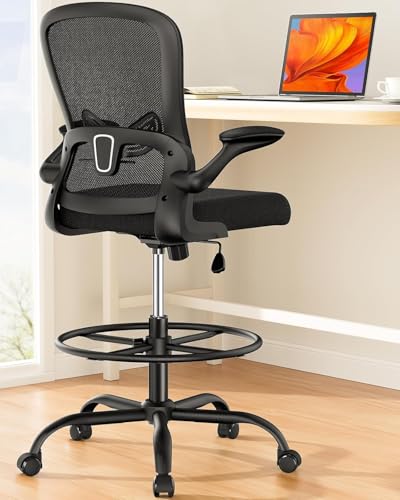
ErGear gives buyers several concrete measurements to work with. The chair has an eight-inch seat-height adjustment range, a 19.7-inch foot ring that adjusts through five inches, and lumbar support with two inches of height adjustment. Those numbers matter in a shared office because the foot ring can be positioned instead of forcing the legs to hang or the knees to rise awkwardly.
The 17-degree mesh backrest is shaped around the back, and the padded armrests flip up when the chair needs to tuck away. A Class-4 gas lift is listed with testing for 120,000 lift cycles, while the extra-large base and heavy-duty casters support up to 300 pounds according to the product information. That makes the chair versatile, though its capacity is lower than the heavy-duty BOLISS, HYLONE-style, and wide-seat alternatives not selected here.
Pros
- Eight-inch seat-height adjustment range
- 19.7-inch foot ring with five inches of adjustment
- Lumbar support adjusts by two inches
- 17-degree breathable mesh backrest
- Flip-up arms and extra-large base
Cons
- 300-pound stated capacity is lower than several heavy-duty alternatives
- The larger base may need more clearance around a compact desk
Choose ErGear if you want a measurable balance between desk compatibility, foot support, and simple storage. It is particularly useful for a standing desk that changes height throughout the day, since both the seat and foot ring offer defined adjustment. Buyers who need a higher stated capacity or headrest support may be better served by one of the BOLISS chairs.
To buy this product, click here.
9. AtHope Drafting Chair, Tall Office Chair with 3D Lumbar and Head Support , Best Head and Lumbar Adjustability
AtHope is the most adjustment-focused option in this selection. Its 3D lumbar support moves up and down by two inches, forward and backward by two inches, and rotates 60 degrees. The 3D headrest moves vertically, forward and backward, and rotates 45 degrees. For a person who spends the afternoon switching between a monitor and a drawing surface, those contact points may make it easier to create a more personalized seated position.
The chair also lists a 22.8 to 30.7-inch seat-height range, an adjustable foot ring, 90-degree flip-up arms, and a built-in rear hanger for a coat or bag. Its breathable mesh fabric, high-density foam, silent casters, and metal base round out the feature set. The listing does not state a weight capacity, so buyers who specifically need heavy-duty support should compare that missing detail with the published capacities of the BOLISS, SONGMICS, or ErGear options.
Pros
- 3D lumbar support adjusts in multiple directions
- 3D headrest with vertical, forward, backward, and rotational adjustment
- 22.8 to 30.7-inch listed seat-height range
- Adjustable foot ring and flip-up arms
- Built-in rear hanger for a coat or bag
Cons
- The listing does not provide a weight capacity
- Its many adjustment points may feel excessive for brief drafting sessions
AtHope is a strong fit for buyers who have struggled to position a fixed lumbar pad or headrest comfortably. It gives the upper body more ways to settle into a computer or drafting posture, and the rear hanger is a pleasant bit of workspace organization. Shoppers who prioritize a verified heavy-duty rating over adjustment range should choose accordingly.
To buy this product, click here.
Buying Guide For Ergonomic Drafting Chairs
Match the Seat Height to the Work Surface
Start with the height of the surface where your forearms will rest. A drafting chair should let you sit high enough to work without lifting your shoulders, but your feet still need a stable place to land. Measure from the floor to the underside of the desk as well as to the top surface. Armrests that rise into the underside can make an otherwise suitable chair impossible to tuck in.
Published ranges help, but they are not the whole story. A chair with a 32.1-inch maximum seat height may suit a tall drafting counter, while a 29-inch maximum may be enough for a mid-height standing desk. The foot ring should move into a position where the feet can rest naturally rather than forcing pressure onto the backs of the thighs.
Look for Real Lower-Back Support
A curved backrest is useful, but an adjustable lumbar pad gives you more control over where support meets your lower back. AtHope offers the most directional adjustment among these picks. The SONGMICS chair provides a simpler height-adjustable lumbar pad, while the BOLISS high-back model adds both lumbar and head support.
Headrests matter most during computer-heavy work, especially when the chair is used at a monitor for long periods. They may matter less if your drafting posture keeps you leaning forward over plans. Avoid paying for a headrest that cannot fit beneath a shelf or monitor arm.
Use the Foot Ring as a Support Feature
A foot ring is more than a decorative circle around the base. At an elevated seat height, it gives your feet a stable platform and can reduce the feeling of dangling legs. Larger rings, such as the one listed for the BOLISS mid-back chair, offer plenty of room to shift position. Smaller rings may be easier to fit around a narrow desk base.
Check whether the ring adjusts independently from the seat. That distinction matters because two people using the same chair may need different leg support, even when they sit at the same work surface.
Decide Whether Arms Help or Get in the Way
Flip-up arms are useful in tight rooms. They allow you to approach the desk more closely, slide the chair beneath it, and move between sitting and standing without catching the armrests on the desktop. The downside is that armrests add width and can interfere with a drafting board or table apron.
For drawing, armrests may support the elbows during computer work but become restrictive when your hands need to move freely across a large sheet. A chair with padded arms is therefore more versatile if the arms can move out of the way.
Check the Base, Casters, and Floor
A tall chair places your center of gravity higher than a standard office chair, so the base deserves attention. Look for the stated base design, caster type, and weight capacity. The supplied listings describe nylon or metal bases, PU casters, dual-wheel casters, and extra-large bases, but those terms do not guarantee identical performance on every floor.
Hard floors, low-pile carpet, and thick rugs can behave very differently under casters. Leave enough room for the chair to roll without striking a cabinet, and confirm that a large foot ring will not hit the desk legs.
Choose the Seat Material for Your Workspace
Mesh backs allow airflow, which can be welcome in a warm office or studio. PU upholstery is easier to wipe clean when the chair sits near paints, graphite, food, or workshop materials. Foam thickness can add cushioning, but thicker padding does not automatically mean better support for every body shape.
Buyers who sit for hours should compare seat width, depth, front-edge shape, and lumbar placement rather than focusing on cushion thickness alone. The waterfall edge listed on several models is intended to reduce pressure behind the knees, a detail that may matter at the end of a long drawing session.
Best Ergonomic Drafting Chairs FAQ
What Makes a Drafting Chair Ergonomic?
An ergonomic drafting chair should let you set the seat high enough for the work surface while supporting your feet, lower back, and arms. Useful features include an adjustable foot ring, lumbar support, a seat edge that does not press sharply behind the knees, and a base that allows controlled movement. No single feature guarantees comfort, so the chair must match your body and desk dimensions.
How High Should a Drafting Chair Be?
The correct height depends on the work surface, your leg length, and the position of your arms. Measure the desk first, then choose a chair whose range places your elbows near the working surface without raised shoulders. A foot ring is especially helpful when the seat must be higher than a standard office chair.
Are Drafting Chairs Good for Standing Desks?
They can be useful with standing desks that have a suitable seated height. A drafting chair lets you alternate between sitting and standing, but the desk must lower far enough for comfortable seated work. Check the chair’s minimum seat height and the desk’s adjustment range before buying.
Do You Need a Foot Ring on a Drafting Chair?
A foot ring is strongly useful when the chair is raised above ordinary desk height. It gives your feet somewhere stable to rest and can reduce pressure on the backs of your thighs. Buyers using a relatively low work surface may need less height and may find a conventional office chair more appropriate.
Are Flip-Up Armrests Useful for Drafting?
They are useful when you need to pull close to the desk, clear a drawing surface, or store the chair underneath the worktop. Armrests can become restrictive during broad hand movements, so flip-up designs offer more flexibility than fixed arms.
Is a Mesh Back Better Than a Padded Back?
Mesh generally allows more airflow, which may feel comfortable in a warm room. Padded backs can provide a softer contact surface. The better option depends on temperature, clothing, support shape, and personal preference. Look at the lumbar design rather than treating mesh or padding as an automatic quality marker.
What Weight Capacity Should a Drafting Chair Have?
Choose a chair whose stated capacity comfortably covers the intended user and normal movement. Several chairs in this roundup list capacities from 300 to 400 pounds, while some listings do not provide a capacity. If that specification matters for your purchase, favor a model with a clearly published figure.
Can a Drafting Chair Replace a Regular Office Chair?
It can if its minimum height suits your regular desk and the foot ring does not interfere with your legs. Some models have broad adjustment ranges that work across several surfaces. A tall chair with a high minimum seat height may be uncomfortable at a conventional desk, so measure before treating it as a two-purpose chair.
Final Verdict
The BOLISS Drafting Tall Office Chair is the strongest overall recommendation among these nine options. Its 24.8 to 32.1-inch stated seat-height range, adjustable foot ring, 3D headrest, adjustable lumbar cushion, waterfall seat edge, and 400-pound capacity give it a well-rounded specification set for elevated work. It is the chair to prioritize when long sessions, varied desk heights, and upper-body support matter more than a minimal footprint.
For a lower-cost, space-conscious choice, the Ergonomic Drafting Chair with flip-up arms keeps the design straightforward and easy to store. The SONGMICS chair adds a wider stated height range and a published 330-pound capacity in a compact format. Buyers who want more specialized positioning should look at the AtHope model, while those who need a broad seat may prefer the BOLISS mid-back chair. Before ordering, measure the desk, underside clearance, seat height, foot-ring position, and available floor space. The most comfortable drafting chair is the one that fits those measurements and your working habits, not simply the one with the longest feature list.
