A large light box earns its desk space when a standard A4 pad leaves your drawing clipped at the edges. Tracing an architectural sheet, transferring a tattoo design, or aligning a full pattern feels far less fiddly with a broad illuminated surface beneath the paper. The challenge is that “large” can mean A3, B4, or a genuinely expansive A1 board, and the difference is substantial once a light pad starts taking over your table.
Buyers often focus on brightness and overlook the working area, power arrangement, control layout, or whether the listed dimensions describe the lit surface or the outer frame. A student working at a small desk may prefer a slim A3 pad, while an artist handling thick paper may need stronger illumination and a longer power cable. Adjustable brightness, even light diffusion, portability, and control placement matter just as much as raw size. Among these options, the HSK A3 LED Artist Tracing Light Box offers the strongest balance of usable space, brightness, controls, and price for most drawing projects.
The comparison below includes genuinely large choices alongside a few smaller-format alternatives for buyers who need easier storage or wireless use. The WELZK A1 is the standout for maximum coverage, while the Artograph LightPad 950 LX is the premium pick for a broad, rigid work surface.
Short on time? Use the table for a quick scan, then jump to the detailed review that matches your drawing size and workspace.
Best Large Light Boxes for Drawing Comparison Table
| Product | Best For | Illuminated Area | Brightness Control | Power |
|---|---|---|---|---|
| HSK A3 LED Artist Tracing Light Box | Best overall | 16.7 × 11.9 inches | Adjustable, up to 6000 lux | Power adapter |
| WELZK A1 Light Pad | Largest drawing coverage | 33 × 21.3 inches | 10 levels and continuous adjustment | 24W adapter, 10-foot cable |
| LitEnergy A4 LED Copy Board | Portable budget drawing | A4 working area | Gradual touch dimming | USB powered |
| Zocelight Rechargeable A4 Light Box | Wireless work and travel | 12.25 × 8.59 inches | 6 levels and continuous adjustment | Rechargeable, USB-C |
| HSK 9 × 13 LED Light Box | Value-conscious compact use | 12 × 8.27 inches | Adjustable, up to 6000 lux | USB cable and power supply |
| U.S. Art Supply Lightmaster | Rigid A3 drawing surface | 12 × 17 inches | Dimmable | 110V AC adapter |
| HSK B4/A3s LED Artist Light Box | Middle-size workspace | 14.2 × 10.2 inches | Adjustable, up to 6000 lux | USB cable and power supply |
| LitEnergy A3 Copy Light Board | Thin A3 portability | A3 size | Gradual touch dimming | USB-C cable |
| LitEnergy Rechargeable Drawing Board | Wireless A4 tracing | 12 × 9 inches | Continuous adjustment | Rechargeable and USB |
The full reviews explain how each light box handles drawing space, controls, power, portability, and practical trade-offs.
1. HSK A3 LED Artist Tracing Light Box , Best Overall

The HSK A3 LED Artist Tracing Light Box hits the useful middle ground between a cramped A4 pad and a room-dominating A1 board. Its listed visual area measures 16.7 by 11.9 inches, giving an A3-oriented drawing project room to breathe while keeping the outer unit at 18.33 by 13.48 inches. That extra border matters when a sheet shifts slightly under your hand or a pattern needs space around the edges.
Its light guide board is specified to provide even, flicker-free illumination, with brightness reaching 6000 lux. Separate dimmer-up and dimmer-down controls are easier to manage than a single multifunction button, especially while a pencil, ruler, or paintbrush is already in your hand. The lock function is a thoughtful touch for tracing and diamond painting, since accidental button presses can turn a bright work area dim at exactly the wrong moment. It suits artists, animators, quilters, and tattoo designers who want broad coverage without stepping into the largest and most expensive formats.
Pros
- Large 16.7 by 11.9-inch visual work area
- Listed brightness of up to 6000 lux
- Separate controls for power and dimming
- Lock function helps prevent accidental touches
- Suitable for drawing, animation, sewing, quilting, and tattoo transfers
Cons
- Requires a wired power connection during use
- Its A3-size surface is smaller than the WELZK A1 and premium 24 by 17-inch options
This is the strongest fit for buyers who want a genuinely useful large tracing area without committing to an enormous tabletop panel. A student transferring plans or an artist working across several sheets can take advantage of the broad visual area, while the lock control keeps the interface from becoming a nuisance. Buyers who routinely work with A1 sheets should move up to the WELZK instead, but most home drawing desks will find the HSK’s size easier to live with.
To buy this product, click here.
2. WELZK A1 Light Pad , Best for Maximum Coverage
Some projects do not want a compact pad stretched to its limits. The WELZK A1 Light Pad provides a listed 33 by 21.3-inch surface, putting it in a different size class from the A3 and A4 products in this roundup. That broad field is especially useful for large patterns, poster work, oversized tracing sheets, and diamond painting layouts where repeatedly repositioning paper becomes a slow, annoying shuffle.
The listing specifies 7000 lux, dual LED light bars, and 24 watts of rated power. It also states that the panel can shine through paper up to 400gsm, although results can vary with paper color, density, and the artwork beneath it. Three color modes, cool white, natural white, and warm light, add flexibility for detailed tracing or longer sessions. Physical controls separate power and brightness functions, while the included 10-foot cable helps in studios where the nearest outlet is playing hide-and-seek.
Pros
- Very large 33 by 21.3-inch illuminated surface
- Listed 7000-lux brightness and 24W power rating
- Three selectable color modes
- Physical controls with 10 brightness levels and continuous adjustment
- Includes a UL-listed adapter and 10-foot cable according to the listing
Cons
- Large footprint demands a spacious, dedicated work surface
- Less convenient to store or carry than slim A3 and A4 pads
The WELZK makes sense for an artist who regularly spreads out large paper and dislikes working in sections. It can also serve a busy craft table where one panel handles drawing, vinyl work, and diamond painting. A small bedroom desk may feel swallowed by its 33-inch length, though, and casual A4 users would be paying for coverage they rarely use. Choose it for the surface first, then enjoy the brightness and color flexibility as useful extras.
To buy this product, click here.
3. LitEnergy A4 LED Copy Board , Best Portable Budget Option

The LitEnergy A4 LED Copy Board is a compact exception in a roundup aimed at large light boxes. Its A4 working area will not handle a broad architectural sheet, yet that smaller footprint can be exactly what a traveling illustrator, school student, or crafter needs. The listed profile is about 0.2 inches thick, so it can slide beside a sketchbook or tuck into a drawer without the clunk of a traditional light table.
Power comes through USB, which lets the board connect to a computer, power bank, or USB adapter. That arrangement is convenient in a classroom or shared workspace, although it does mean the product is not rechargeable by itself. Brightness adjusts through a gradual touch control, and the listing describes flicker-free LED lighting with even illumination. For tracing small illustrations, stencils, calligraphy, or tattoo patterns, the slim board keeps the setup refreshingly simple.
Pros
- Thin approximately 0.2-inch profile
- A4 working area suits common paper and craft formats
- USB power works with computers, power banks, and USB adapters
- Gradual touch brightness adjustment
- Listed for tracing, animation, calligraphy, sewing, and diamond art
Cons
- A4 coverage is limited for large drawings and full-size patterns
- USB powered rather than rechargeable
This is a sensible choice for someone who searched for a large light box but realized that portability matters more than maximum coverage. It is easy to move from a kitchen table to a studio corner, and its USB connection fits modern mobile work habits. Buyers drawing across A3 sheets should skip this compact option and choose the HSK A3 or LitEnergy A3 instead.
To buy this product, click here.
4. Zocelight Rechargeable A4 Light Box , Best for Wireless Use

For a light box that moves around the house, a cable can feel like a leash. The Zocelight A4 addresses that frustration with a built-in battery rated by the listing for approximately four to six hours of wireless use after about two hours of charging. Its visible area measures 12.25 by 8.59 inches, so it is a compact model, but the freedom from an outlet makes it attractive for couch-side sketching, workshops, and temporary workstations.
The package includes a padded carry case, a built-in stand, and a top clip for holding paper or diamond-painting canvas. The stand has one angle rather than a broad range of adjustment, yet it can still lift the panel away from a flat tabletop. Brightness offers six preset levels plus continuous adjustment, with a stated color-temperature range from 3000K to 6500K. The included pencil, sharpener, eraser, tracing sheets, and artwork samples make the set feel ready for casual projects straight from the box, though the adapter is not included.
Pros
- Built-in battery supports approximately four to six hours of listed use
- USB-C charging and wired operation provide two power options
- Padded case helps with transport and storage
- Built-in stand and top clip improve tabletop convenience
- Six brightness levels plus continuous dimming
Cons
- A4-size working area is modest for large drawings
- Power adapter is not included, and the stand has one angle
The Zocelight suits artists who draw in different rooms or want a protected kit for travel. Picture a student carrying a case from a dorm room to a library table, then working without searching for an outlet. A large-format illustrator should look elsewhere, but buyers who value wireless freedom, paper retention, and easy packing may prefer this over a larger wired pad.
To buy this product, click here.
5. HSK 9 × 13 LED Artist Tracing Light Box , Best Value Compact Option

The HSK 9 by 13 LED Artist Tracing Light Box shares the practical control layout of the larger HSK model while trimming the working area to 12 by 8.27 inches. That makes it more useful for a small desk, craft shelf, or beginner’s drawing station than its larger sibling. The outer panel is listed at 13 by 9 inches, so the difference between the advertised frame size and visual area is easy to understand.
Despite its compact proportions, the listing specifies up to 6000 lux, flicker-free LEDs, and an aluminum frame. The brightness controls include separate dimmer buttons, while a lock mode helps prevent accidental changes during tracing. It arrives with a power supply and USB cable, giving buyers flexibility around the outlet. This is a practical low-cost route into light-assisted drawing, although the size limits it to smaller sheets and partial pattern work.
Pros
- Listed 6000-lux brightness in a compact format
- Aluminum frame and thin light-pad design
- Separate brightness controls simplify operation
- Lock function helps prevent accidental input
- Includes a power supply and USB cable
Cons
- 12 by 8.27-inch visual area is unsuitable for full large-format drawings
- Wired use limits placement compared with rechargeable models
This HSK works well for a beginner who wants clear illumination without making a major investment or surrendering much desk space. A child tracing illustrations at the dining table or a crafter working on small templates can benefit from its bright, simple interface. Choose the larger HSK A3 if your projects often approach A3 dimensions, since the extra surface is more useful than a minor saving in storage space.
To buy this product, click here.
6. U.S. Art Supply Lightmaster , Best Rigid A3 Surface

The U.S. Art Supply Lightmaster takes a more traditional lightbox approach, with a listed 12 by 17-inch A3 working surface and a 3/8-inch profile. That broad rectangular area is useful for artists who want A3 coverage without moving all the way to an A1 panel. The product description emphasizes uniform light diffusion, which matters when a dark band or bright hotspot interrupts a carefully aligned tracing line.
Its LEDs are described as flicker-free, dimmable, and maintenance-free, with a listed life of up to 50,000 hours. Power comes from a 110V AC adapter, so this model belongs on a settled home or studio desk rather than in a backpack. The construction and straightforward controls may appeal to someone who values a stable, dedicated drawing surface over wireless convenience. Buyers should still measure their desk before ordering, since a 12 by 17-inch lit area needs meaningful room around it for paper and tools.
Pros
- Spacious 12 by 17-inch A3 working surface
- 3/8-inch profile provides a defined lightbox format
- Dimmable, flicker-free LED illumination
- Listing specifies uniform light distribution across the surface
- Suitable for tracing, stenciling, animation, sewing, and quilting
Cons
- 110V AC power makes it less portable than USB models
- Offers less surface area than A1 and 24 by 17-inch alternatives
The Lightmaster belongs in a home studio where A3 drawing is routine and the panel can remain ready for use. Someone tracing sewing patterns one evening and architectural sketches the next may appreciate its broad, uncluttered surface. A mobile artist or a user with very limited table depth will find the fixed AC setup less convenient, while the HSK A3 offers more portable-minded controls.
To buy this product, click here.
7. HSK B4/A3s LED Artist Light Box , Best Middle-Size Option
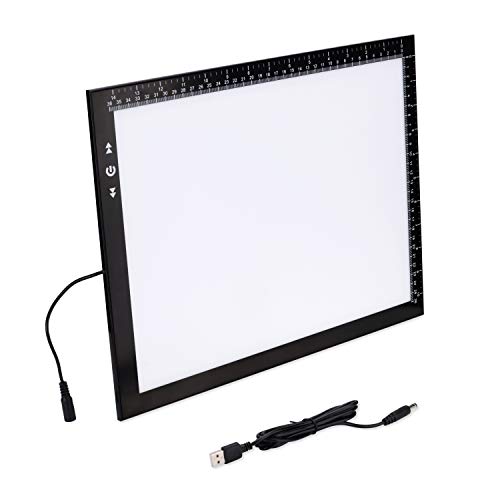
The HSK B4/A3s sits between the compact 9 by 13-inch HSK and the larger A3 models. Its visual area is listed at 14.2 by 10.2 inches, with an overall size of 15.79 by 11.85 inches. That middle format can be handy for someone who wants more elbow room than A4 but lacks the desk depth for a full 17-inch panel.
Like the other HSK pad in this group, it uses an aluminum frame, a light guide board, and flicker-free illumination rated at up to 6000 lux in the listing. Separate brightness buttons make quick adjustments familiar, and the lock combination can stop a sleeve or ruler from changing the setting. It supports a broad mix of activities, from sketching and calligraphy to quilting and diamond painting. The trade-off is simple: it is easier to house than a full A3 panel, yet it may still leave the edges of larger drawings outside the lit area.
Pros
- 14.2 by 10.2-inch visual area bridges A4 and A3 needs
- Listed brightness of up to 6000 lux
- Aluminum frame and light guide board
- Separate dimmer controls and lock function
- Broad use range across drawing, crafts, and pattern work
Cons
- Still too small for full A3 or larger sheets
- Requires a wired power source during use
This is a clever fit for a shared desk where every inch matters. A teenager working on illustrations beside a laptop or a hobbyist switching between sketching and fabric patterns may find the proportions easier than a true A3 board. Buyers who already know they need full A3 coverage should spend the extra space on the HSK A3 or U.S. Art Supply model instead.
To buy this product, click here.
8. LitEnergy A3 Copy Light Board , Best Thin A3 Pad

The LitEnergy A3 Copy Light Board is aimed at buyers who want the reach of A3 without the bulk of a traditional light table. The listing describes the entire tablet as A3 size and approximately 6mm thick, which makes it easy to carry between a studio, classroom, and dining table. Its slim shape also leaves less of a raised edge around a drawing, a small detail that can make rulers and paper feel less awkward.
Brightness uses a touch button with gradual adjustment, while the light guide board is described as providing even, flicker-free illumination without shadows or glare. The package includes a Type-C cable, but the listed design is cable powered rather than battery operated. A stated one-year warranty is included in the product information, although buyers should review the current seller terms before purchase. This model fits illustrators, animators, crafters, and vinyl workers who value a thin A3 panel more than physical control buttons or a built-in stand.
Pros
- A3-format surface in an approximately 6mm-thick design
- Even, flicker-free light guide illumination
- Gradual touch brightness adjustment
- USB-C cable supports convenient power connections
- Suitable for drawing, animation, calligraphy, sewing, and vinyl work
Cons
- Does not provide the wireless operation of rechargeable models
- Touch-only control may be less convenient than separate physical buttons
The LitEnergy A3 is the one to pack when a full-size drawing area matters but a thick, heavy lightbox would be overkill. It could slip into a portfolio alongside paper and tools, then sit nearly flat on a classroom table. A buyer who frequently works with thick paper may prefer the stronger specifications of the WELZK, while someone who dislikes touch controls may lean toward the HSK A3.
To buy this product, click here.
9. LitEnergy Rechargeable Drawing Board , Best Wireless A4 Alternative

The LitEnergy Rechargeable Drawing Board is another compact model included for buyers whose idea of a large light box is simply “larger than a phone-sized tracing pad.” Its work surface measures 12 by 9 inches and fits an A4 sheet, while the 8mm thickness and listed 0.55kg weight keep it manageable for storage and travel. A printed measurement scale supports positioning, which can be useful when transferring repeated shapes or aligning a small pattern.
The built-in battery is listed for approximately 3.5 hours after a full charge, with USB operation available when a cable is nearby. Brightness adjusts continuously through a touch-sensitive control, and the product description lists a maximum brightness of 4000 lux. The panel is intended for drawing, sketching, stenciling, sewing, calligraphy, and diamond art. That range makes it a flexible family or classroom tool, though its illuminated area cannot compete with the A3 and A1 choices for broad-format work.
Pros
- Rechargeable battery supports approximately 3.5 hours of listed use
- USB and battery operation provide flexible placement
- 12 by 9-inch A4-compatible work surface
- Attached measurement scale assists positioning
- Continuous brightness adjustment with touch control
Cons
- 4000-lux maximum is lower than the brighter HSK and WELZK listings
- A4 coverage is limited for large drawings and full patterns
This model suits a mobile hobbyist, child, or student who wants to trace away from a permanent desk. Imagine working on a patio or a classroom table where an outlet is out of reach, then charging the board later through USB. For a professional artist handling large sheets, the short battery runtime and smaller surface will feel restrictive, making an A3 or A1 panel a better long-term fit.
To buy this product, click here.
Buying Guide for Best Large Light Boxes for Drawing
Start With the Lit Surface
The illuminated area matters more than the outer dimensions printed on the box. The HSK A3, for example, lists an overall size of 18.33 by 13.48 inches but a visual area of 16.7 by 11.9 inches. That distinction tells you how much paper can actually receive backlighting. Measure the drawing format you use most often, then leave room for a ruler, pencil, and your forearms around the panel.
A1 panels such as the WELZK provide dramatically more coverage than A3 products, but the larger surface also needs a more substantial desk. A3 is often the practical sweet spot for home drawing, while A4 is better treated as a portable or compact format rather than a large-format solution.
Compare Brightness Carefully
Brightness figures can help compare products, but they do not tell the entire story. The supplied listings specify up to 7000 lux for the WELZK, up to 6000 lux for the HSK models, and up to 4000 lux for the LitEnergy rechargeable board. Light diffusion, paper thickness, room lighting, and the contrast of the artwork beneath the sheet all affect how useful that brightness feels.
For thin sketching paper, moderate brightness may be comfortable. Thick cardstock, layered paper, or fabric patterns may call for a stronger panel. A dimmer is valuable because maximum output can feel harsh during a long session, especially in a dark room.
Choose the Control Layout You Will Actually Use
Touch controls keep a light pad sleek, but they can be easy to trigger accidentally while moving paper. The HSK models include separate brightness controls and a lock function, while the WELZK uses physical buttons with separate brightness operation. LitEnergy’s pads use touch-based gradual dimming, which saves space but may require a longer press to reach the desired level.
If you frequently reposition a ruler or rest your hand near the controls, physical buttons or a lock mode can save irritation. If a clean, flat surface matters most, touch controls may be perfectly adequate.
Think About Power and Placement
USB-powered pads are easy to connect to a computer, power bank, or adapter, but they still need a cable while working. AC models are better suited to a permanent studio location. Rechargeable products such as the Zocelight and LitEnergy drawing board offer genuine freedom from outlets, though battery runtime and charging accessories become part of the routine.
Check what the package includes. The Zocelight listing includes a Type-C cable but says the adapter is not included. The WELZK includes an adapter and a 10-foot cable, which is more convenient for a large studio table. These small details can determine whether the light box works smoothly on the first day.
Look for Features That Match the Project
A clip can hold tracing paper or a diamond-painting canvas in place. A stand can reduce the need to lean over a flat panel, although a single-angle stand offers less flexibility than an adjustable one. Color modes, as found on the WELZK, can help buyers who switch between detailed tracing, color sorting, and long work sessions.
For sewing and quilting, the usable surface and even diffusion may matter more than portability. For animation, a thin A3 board can be easier to move between pages. For tattoo transfers, brightness control and a surface large enough for the design are usually more useful than extra accessories.
Best Large Light Boxes for Drawing FAQ
What Size Light Box Is Best for Large Drawings?
A3 is a practical starting point for many home drawing setups, but A1 provides far more room for oversized patterns and broad sheets. Check the actual illuminated area rather than relying on the product name. The WELZK offers a listed 33 by 21.3-inch surface, while the HSK A3 lists a 16.7 by 11.9-inch visual area.
Is A3 Large Enough for Drawing?
A3 is large enough for many illustrations, tattoo designs, sewing patterns, and animation work. It may feel restrictive for full architectural sheets, posters, or large fabric layouts. Buyers who routinely work beyond A3 should look at the WELZK A1 or a 24 by 17-inch panel such as the Artograph LightPad 950 LX.
How Bright Should a Drawing Light Box Be?
Choose a model with adjustable brightness rather than relying on maximum output alone. Higher listed lux can help with thicker paper, but the comfortable setting depends on the room, paper, and artwork. The products here list brightness from 4000 lux on the LitEnergy rechargeable board to 7000 lux on the WELZK.
Are Rechargeable Light Boxes Worth It?
Rechargeable models are useful for classrooms, workshops, travel, and rooms without a convenient outlet. Their limits are battery runtime and charging time. The Zocelight lists approximately four to six hours of wireless use, while the LitEnergy rechargeable board lists approximately 3.5 hours.
Do Light Boxes Work Through Thick Paper?
They can, but the result depends on the paper’s density, color, and the brightness of the panel. The WELZK listing specifically describes illumination through paper up to 400gsm. Other products may work well with thinner drawing paper while becoming less effective through heavy cardstock or multiple layers.
Should a Light Box Have a Stand?
A stand can make a flat light pad more comfortable for certain drawing positions and may reduce the need to bend over the table. The Zocelight includes a built-in stand with one angle. A stand is less important for a user who already works on an adjustable drafting surface or prefers a flat panel.
Are A4 Light Pads Suitable for Professional Drawing?
A4 pads can work well for small illustrations, tracing, tattoo transfers, and detail work. They are less suitable for professionals who regularly handle large sheets or need to see an entire pattern at once. The LitEnergy A4 and compact HSK models make more sense for portability and small-format work than for broad drawings.
Final Verdict
The HSK A3 LED Artist Tracing Light Box is the strongest overall fit among these nine products. Its 16.7 by 11.9-inch visual area gives artists useful room without demanding the enormous desk footprint of an A1 board. The listed 6000-lux brightness, separate dimmer controls, lock function, and wide application range create a well-balanced package for drawing, animation, quilting, and tattoo transfers. It is the option to reach for when you want a genuinely useful large light box that still feels manageable at home.
The WELZK A1 is the clear alternative for maximum coverage and thick-paper tracing, while the U.S. Art Supply Lightmaster offers a more traditional rigid A3 surface. Buyers who value mobility should look at the rechargeable Zocelight or LitEnergy board, and those with tight budgets or limited desk space can choose one of the compact HSK or LitEnergy pads. Match the illuminated area to your most common paper size, confirm the power arrangement, and leave enough table space around the panel for the tools that make drawing flow smoothly.
