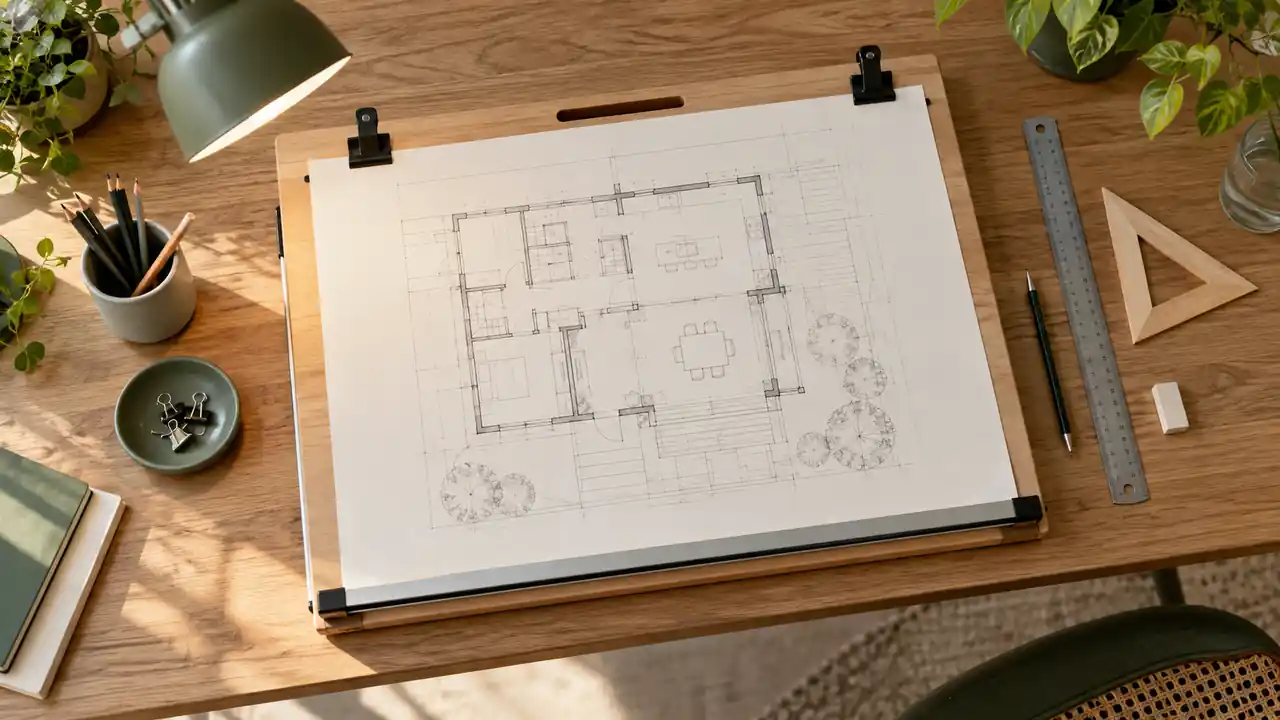
The short answer is that an A3 sheet measures 297 × 420 mm, but an A3-sized drawing board is usually too tight for comfortable drafting. For routine work, look for a board with at least about 450 × 330 mm of usable surface. A board around 500 × 350 mm or 500 × 400 mm gives more practical room for clips, hand movement, and drawing tools.
That extra space matters when an A3 sheet is taped down, held beneath clips, or used with a T-square or parallel rule. A board that matches the paper exactly may technically support the sheet, yet leave your fingers skating off the edges every time you adjust a line. The best size depends on whether you are sketching loosely, producing precise technical drawings, or using a mounted straightedge.
A3 Paper Dimensions and Orientation
A3 is part of the ISO 216 paper-size system. Its exact dimensions are:
| Measurement | Metric | Approximate Imperial Size |
|---|---|---|
| Short edge | 297 mm | 11.69 in |
| Long edge | 420 mm | 16.54 in |
In portrait orientation, the sheet is 297 mm wide and 420 mm tall. Turn it sideways for landscape orientation, and it becomes 420 mm wide and 297 mm tall. That simple rotation changes which board dimension needs the most clearance, especially when a parallel bar runs along the long edge.
Someone making quick presentation sketches may place an A3 sheet in portrait format and work mostly in the center. A student drawing floor plans in landscape format may need the full 420 mm width plus room for a ruler and a supporting hand. Both are using A3 paper, but they are not asking the board to do exactly the same job.
Recommended Drawing Board Sizes for A3 Paper
There is no single mandatory board size for every A3 application. A useful way to judge the options is to separate the paper dimensions from the usable drawing area, which is the portion left available after clips, hardware, edges, and mounted accessories are taken into account.
| Board Size | How It Works With A3 Paper | Best Suited To |
|---|---|---|
| 420 × 297 mm | Matches the sheet and leaves virtually no working clearance | Temporary support or very compact storage |
| 450 × 330 mm | Provides modest clearance around the sheet | Basic sketching and portable drafting |
| 500 × 350 mm | Offers useful clearance without becoming excessively large | General A3 drafting and student work |
| 500 × 400 mm | Provides more room for tools, hands, and edge-mounted equipment | Technical drawing and frequent manual drafting |
| Larger than 500 × 400 mm | Creates a generous work zone around A3 paper | Fixed studio setups or multi-tool work |
For many people, 500 × 350 mm is a sensible minimum target for comfortable A3 work, while 500 × 400 mm gives a more relaxed setup. These are practical recommendations rather than formal A3 requirements. A board advertised as 500 mm wide may also include a frame, ruler track, or non-working border, so always check the actual surface available to the paper.
Why an A3-Sized Board Feels Too Small
A board measuring exactly 297 × 420 mm can hold an A3 sheet only if there is no meaningful edge hardware and the sheet is positioned perfectly. In practice, tape may extend beyond the paper, clips may occupy corners, and a ruler needs a clean edge to register against. The result can feel cramped even before the pencil touches the page.
Imagine drawing a long horizontal wall line near the lower edge of an A3 plan. With no spare board surface, the T-square may bump into the board frame while your wrist hangs over the edge. A few extra centimeters give the straightedge somewhere to rest and leave your hand on a stable surface, which is a small physical difference during a short sketch and a major comfort difference during a long plate.
Clearance for Clips and Tape
Clips need space outside the main drawing area, particularly if they sit along the top or sides of the board. Tape is less demanding, but even taped paper benefits from a narrow border of board around the sheet. That border helps prevent the paper from shifting and gives you somewhere to press while smoothing out wrinkles or lifting a corner.
A portrait A3 sheet on a 500 × 350 mm board leaves more room along the 297 mm width than along the 420 mm height. Rotate the sheet, and the clearance pattern changes. Before buying or building a board, place a paper rectangle measuring 297 × 420 mm on the proposed surface and mark where clips, rulers, and your hands will actually go.
Clearance for Drawing Instruments
Manual drafting rarely involves only paper. A pencil, eraser, scale ruler, set square, sharpener, and tracing scraps can quickly crowd a small surface. If you use a T-square, the board must also provide a reliable edge for the head of the T-square to run against. A parallel rule may require even more unobstructed space along one or both sides, depending on its mounting design.
For example, an illustrator making small studies may need little more than a pencil and eraser beside the page. A technical drafter working on an A3 detail may keep a scale, triangle, brush, and correction tool within reach. The paper has not changed, but the required working area has expanded around it.
How to Calculate the Board Size You Need
You can estimate a suitable board by adding working clearance to each paper dimension. A simple planning formula is:
Board dimension = paper dimension + left clearance + right clearance
For A3 paper, that means starting with 297 × 420 mm and then adding space for the way you work. If you allow approximately 25 mm around the sheet on each side, the paper zone alone becomes roughly 347 × 470 mm. That does not necessarily mean you must buy a board with those exact dimensions, because some of that area may be unnecessary for your tools or may be provided by a ruler system. It does show why a board only slightly larger than A3 can become restrictive.
A person using removable tape on a flat board might be comfortable with around 15 to 25 mm of free surface around much of the sheet. Someone using corner clips, a parallel rule, or a raised board edge may need more room on particular sides. Measure the hardware, not just the paper, before treating a listed board dimension as usable workspace.
Choosing Between Compact and Comfortable Sizes
When a 450 × 330 mm Board Is Enough
A board around 450 × 330 mm can work well when portability and storage matter more than generous elbow room. It is suitable for light sketching, classroom exercises, field drawing, and occasional A3 work, provided the actual usable surface is close to the stated dimensions.
Consider a student carrying a board between a studio, library, and shared apartment. A compact board may slide into a portfolio or fit on a narrow desk, while a much larger surface becomes awkward to transport. If the student mainly tapes paper down and uses a short ruler, the reduced clearance may be a reasonable trade-off.
Why 500 × 350 mm Is a Practical General Size
A board around 500 × 350 mm gives A3 paper a noticeable margin without taking over an ordinary desk. It can accommodate paper in either orientation, although the available clearance will not be identical in portrait and landscape formats. This size is often a useful middle ground for sketching, technical exercises, and general manual drafting.
It also leaves a little breathing room for an eraser and scale ruler. When a drawing runs close to one edge, you can shift your hand onto the board instead of balancing it on the table beside the board, which makes repeated line work feel less cramped.
When 500 × 400 mm or Larger Makes Sense
A larger board is worthwhile when you draft frequently, use mounted equipment, or want space around the sheet for several instruments. The additional depth can be especially helpful when a parallel rule occupies an edge or when the board is tilted and tools need a secure resting area.
A fixed home workstation is a different situation from a portable classroom setup. On a sturdy desk, a 500 × 400 mm board may provide a comfortable A3 work zone. In a crowded dorm room or small office, that same board may leave little room for a laptop, lamp, or reference material. Check the entire desk footprint, not only the board dimensions.
Account for Drafting Board Hardware
Published dimensions do not always describe the same thing. One manufacturer may list the overall board, including a frame. Another may state the flat working surface. A third may give the paper capacity of a clip system. Those measurements are not interchangeable.
Before selecting a board, check whether the listed size refers to:
- the total outside dimensions;
- the flat drawing surface;
- the area available after a ruler track or border;
- the maximum paper size accepted by clips;
- the surface width and depth excluding a frame or handle.
A board with a 500 mm outside width might have less than 500 mm of clear surface if a frame takes up space along the edges. Similarly, a board that accepts A3 paper may hold the sheet securely but provide little room beside it. Product specifications and diagrams should be read with those distinctions in mind.
Parallel Rules and T-Squares
A T-square needs a straight, unobstructed board edge. If the board has a thick lip, curved edge, or raised frame, the head may not travel smoothly. A parallel rule may be integrated into the board or attached separately, and its tracks can reduce the clear area available for paper.
If you already own a favorite ruler, measure its working length and mounting requirements first. A 420 mm A3 sheet may fit the board, yet a shorter ruler may fail to span the useful drawing width in landscape orientation. Equipment compatibility can matter more than a small difference in the board’s advertised size.
Clips, Corner Stops, and Surface Edges
Built-in clips are convenient, but they can cover corners of the sheet or force the paper into a particular position. Corner stops can also consume a strip of usable space. These details are not problems by themselves, but they should be included in the layout calculation.
For a clean technical drawing, keep clips away from areas where dimensions, labels, or title information must be written. If the hardware occupies the top edge, extra board depth above the sheet may be more valuable than extra width at the sides.
Flat Boards, Tilting Boards, and Desk Space
The board’s footprint is only part of the setup. A tilting board projects farther across the desk as it rises, and the lower edge may move toward the user. Leave enough room for the board, paper, drafting instruments, and your forearms at the chosen angle.
A flat 500 × 350 mm board may fit neatly on a shallow desk, while the same board tilted upward can need additional clearance behind or in front of it. A lamp base, monitor, or stack of reference books can become an unexpected obstruction. Test the board at its intended working angle before permanently arranging the surrounding workspace.
Height and viewing angle are personal setup variables rather than fixed A3 requirements. The drawing surface should allow you to see the page clearly without repeatedly leaning far forward, and your chair or standing position should leave your feet supported and your shoulders relaxed. If discomfort persists, changing position and taking breaks is more appropriate than assuming a particular board size will solve it.
A3 Drawing Board Size for Architecture Students
A3 boards are popular for compact technical drawings, diagrams, and presentation sketches, but course requirements vary between schools and assignments. One studio may emphasize hand drafting, while another may use A3 mainly for quick studies alongside CAD work. Check the instructor’s requirements before treating a specific board dimension as compulsory.
For a student who moves between classrooms, a portable board around 450 × 330 mm may be easier to carry. For someone with a permanent studio desk and frequent manual drafting, a 500 × 350 mm or 500 × 400 mm surface may be more comfortable. Storage matters too, because a board that cannot slide under a bed, into a portfolio cabinet, or beside a desk may become a daily nuisance.
What to Measure Before Buying or Building a Board
Use the actual dimensions of your paper and equipment rather than relying only on the label “A3.” A quick layout check can prevent a board from feeling undersized once it reaches the desk.
- Measure the A3 sheet as 297 × 420 mm.
- Decide whether you will use portrait, landscape, or both orientations.
- Mark the area occupied by clips, tape, a T-square, or a parallel rule.
- Add clear space for your hand, pencil, eraser, and scale ruler.
- Check the board’s usable surface, not only its outside dimensions.
- Measure the available desk, storage, and transport space.
- Confirm that the board remains stable at the angle you plan to use.
A paper rectangle drawn on cardboard is a useful low-cost test. Place it on the proposed desk, add the ruler and clips, and try the movements needed for a typical drawing. If your hand repeatedly hits the desk or your straightedge runs into a frame, the board needs more usable clearance even if the paper technically fits.
Can You Use an A2 Drawing Board for A3 Paper?
Yes. An A2 board is larger than necessary for a single A3 sheet, but the extra area can be useful for tools, reference material, or occasional larger work. A2 paper measures 420 × 594 mm, so an A2-capable board will generally provide more room than an A3-only setup.
The trade-off is size and weight. A larger board may need a deeper desk, more storage space, and a stronger support surface. If you only ever draft on A3, the additional footprint may offer little benefit. If your work moves between A3 and A2, using the larger board can avoid replacing the setup later.
Final Recommendation
For A3 paper, avoid choosing a board that is exactly 297 × 420 mm unless compactness is the only priority. A practical starting point is at least 450 × 330 mm of usable surface, with 500 × 350 mm offering a more comfortable general-purpose arrangement. Choose around 500 × 400 mm or larger when you use drafting hardware, need room for several tools, or prefer generous clearance around the sheet.
Before deciding, place an A3 sheet on the board dimensions you are considering and account for the clips, straightedge, hand position, and desk space. The paper establishes the minimum footprint, but the way you actually draw determines how much board you will want around it.
