A desk can look calm at 9 a.m. and resemble a tiny construction site by lunch. Trace rolls drift into the keyboard, redlines pile up beside the mouse, and the one fineliner you need vanishes beneath a stack of material samples. Architects often need several kinds of organization at once, from shallow compartments for pens and clips to vertical storage for project folders and large-format systems for drawings.
Buying by compartment count alone can create a different flavor of clutter. A bulky paper rack may swallow valuable sketching room, while a compact pencil caddy will barely touch a backlog of plans. Footprint, document format, visibility, capacity, and material matter more. Some buyers need A4 paper close at hand, some need 36-inch drawing storage, and others simply want their markers to stop rolling onto the floor.
The Marbrasse Mesh Pen Holder is our top overall recommendation for everyday desktop tools because its angled compartments, flat sections, tray, and drawer balance access with a modest 9.33 by 8.5-inch footprint. Larger studios should also pay close attention to the ALVIN roll file and Estune hanging clamps, which tackle the awkward tubes and sheets that ordinary office organizers cannot tame.
Quick Answer
For daily drawing tools: The Marbrasse Mesh Pen Holder offers the most versatile mix of open compartments and concealed storage. For active project paperwork: The larger Marbrasse File Organizer combines sliding trays, magazine holders, pen cups, and a drawer. For rolled plans: The mobile ALVIN WRF55 keeps up to 12 rolls separated and off the desk. For hanging large-format sheets: The Estune clamp set suits offices with a compatible hanging rack and a substantial drawing archive.
Short on comparison time? The table below shows where each organizer fits before the detailed reviews begin.
Best Desk Organizers for Architects Comparison Table
| Product | Best For | Storage Format | Key Specification |
|---|---|---|---|
| Marbrasse Mesh Pen Holder | Everyday drafting tools | Angled compartments, tray, drawer | 9.33 × 8.5 × 3.54 inches |
| Marbrasse File Organizer | Mixed paper and tool storage | Five trays, two vertical holders, drawer | 13.8 × 11 × 12 inches |
| gianotter Desktop File Organizer | Compact vertical filing | Five upright compartments | Reinforced steel base |
| Marbrasse Two-Drawer Pen Organizer | Small desks and students | Five open areas and two drawers | 7.6 × 5.5 × 3.9 inches |
| Amazon Basics Mesh Desk Organizer | Simple tool storage | Open desktop caddy | 9.1 × 5.9 × 5.5 inches |
| SUPEASY Five-Compartment File Holder | Labeled project sorting | Five vertical compartments | 16.34 × 12.01 × 12.4 inches |
| Estune Blueprint Hanging Clamps | Large-format drawing archives | Hanging clamps | 12 clamps, 36 inches each |
| ALVIN WRF55 Wire Bin Roll File | Rolled plans and maps | Mobile 12-slot bin | 30 × 24 × 18 inches |
| Retractable Dimmable LED Desk Lamp | Reducing lighting and cable clutter | Retractable task-lighting station | 50 light combinations and USB port |
The full reviews below explain how these very different storage formats behave around sketches, folders, models, and large-format drawings.
1. Marbrasse Mesh Pen Holder: Best Overall

The Marbrasse earns the top position by addressing the jumble that accumulates during ordinary design work. Its six tilted compartments place frequently used pens and markers at an easy grabbing angle, while four flat-bottom sections accommodate scissors, rulers, or bulkier tools. A top tray catches loose erasers and clips, and the drawer gives tiny items a home before they scatter like gravel across the desk.
At 9.33 by 8.5 by 3.54 inches, it occupies more surface area than a single pencil cup but remains practical beside a laptop or drawing board. The metal mesh keeps contents visible, which helps when someone needs a specific gray marker while comparing elevations on screen. Non-skid feet should also be useful during quick, one-handed retrieval, when a lightweight caddy might otherwise skid across a smooth tabletop.
Pros
- Six tilted compartments keep drawing instruments visible and easy to reach
- Four flat sections accommodate varied tools rather than pens alone
- Integrated tray and drawer separate clips, erasers, and other small pieces
- Metal mesh construction suits frequent office use
- Non-skid feet help protect the work surface and limit sliding
Cons
- The 8.5-inch depth consumes more room than a basic upright pen cup
- Its shallow drawer is intended for small supplies rather than notebooks or documents
This is the strongest all-around fit for an architect who wants pencils, fineliners, markers, scales, sticky notes, and tiny accessories gathered in one visible station. It cannot solve paper or blueprint storage, so pair it with a file holder if project folders are the bigger headache. For daily hand-sketching tools, however, its compartment variety gives it a clear practical edge over simpler caddies.
To buy this product, click here.
2. Marbrasse Desk Organizer With File Holder: Best for Mixed Project Materials
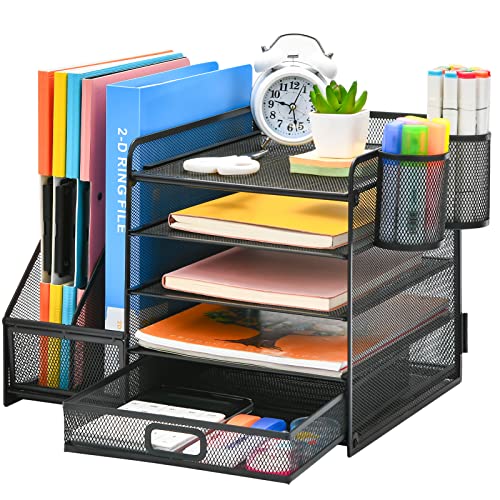
A working architect rarely deals with pens in isolation. There are printouts awaiting markup, product sheets saved for reference, meeting notes that cannot disappear, and folders moving between active and completed status. This Marbrasse organizer handles that mixed stream with five sliding trays, two magazine holders, two hanging pencil cups, and one sliding drawer inside a unified mesh frame.
The 13.8 by 11 by 12-inch size makes this a real desktop station rather than a petite caddy. Picture one tray holding incoming redlines, another collecting reviewed sheets, and a vertical section supporting code books or project folders. The arrangement can replace several loose accessories, although its height and volume call for a deeper desk, side credenza, or dedicated corner away from the main sketching zone.
Pros
- Five sliding trays create separate stages for active paperwork
- Two vertical holders accommodate folders, magazines, and reference material
- Hanging pen holders keep writing tools outside the paper compartments
- Sliding drawer contains clips and other small office supplies
- Metal mesh is reinforced with a solid steel frame
Cons
- The 13.8 by 11-inch footprint can crowd a compact drafting surface
- Assembly is required before the organizer can be used
Choose this model if loose letter-size or A4 paperwork causes more trouble than loose pencils. It is particularly relevant to project leads juggling submittals, consultant notes, and current drawing sets in a compact office. Someone working almost entirely from a tablet may find its paper capacity excessive, while a student with several course folders could put every tier to work by the end of the week.
To buy this product, click here.
3. gianotter Desktop File Organizer: Best Compact Vertical File Holder

Sometimes a row of upright dividers is more useful than an elaborate tower of trays. The gianotter uses five compartments to keep folders, magazines, books, or a tablet separated and visible. Mesh sides let the color and general shape of each item show through, so grabbing the blue interiors folder does not require flipping through a compressed paper stack.
Its reinforced alloy-steel base and top-mounted sorter are intended to support the vertical arrangement, while non-slip scratch guards sit between the organizer and the desk. This straightforward format works nicely on a narrow return or bookshelf. A designer can separate five active projects, or a student can divide studio briefs, tracing pads, references, and notebooks before the weekly pile develops a life of its own.
Pros
- Five compartments provide simple visual separation
- Vertical layout preserves more horizontal sorting space
- Mesh construction makes folders easier to identify
- Reinforced steel base supports the upright structure
- Non-slip guards help protect finished desk surfaces
Cons
- No drawer or pen compartment is included for small drafting supplies
- Upright storage is less suitable for loose sheets that need flat support
This organizer favors architects who already use folders and want those folders standing within arm’s reach. It lacks the little-item storage of either Marbrasse caddy, yet that simplicity can be refreshing on a restrained workstation. Use it for sturdy project files, notebooks, or an iPad rather than floppy tracing sheets, which are likely to behave better inside a folder first.
To buy this product, click here.
4. Marbrasse Two-Drawer Pen Organizer: Best for Small Desks

Studio apartments and dorm rooms punish every unnecessary inch. This Marbrasse model measures 7.6 by 5.5 by 3.9 inches, making it the most compact multi-section caddy among the reviewed options. Three pen compartments, a top tray, a notebook holder, and two drawers divide everyday supplies without creating a large black mesh silhouette beside the computer.
The ABS plastic body is waterproof and easy to wipe, a useful quality when coffee, graphite dust, or marker smudges appear around a late-night model-making session. Transparent drawer fronts reveal what is inside before they are opened. Those drawers could separate spare blades from binder clips, while the taller rear area holds a small notebook or tablet, depending on its dimensions and case.
Pros
- Compact footprint suits crowded student and home workstations
- Two drawers separate small, easily misplaced accessories
- Transparent drawer fronts make contents visible
- Waterproof ABS plastic can be wiped clean
- No assembly is required
Cons
- Plastic construction offers a different look and feel from steel mesh
- Limited capacity makes it unsuitable for folders or large tool collections
Students, interns, and remote workers with a narrow desktop are the natural audience. The white finish can visually soften a packed workspace, while the closed drawers hide the noisy confetti of clips and eraser crumbs. Architects with dozens of markers or several active project folders will outgrow it quickly, but disciplined users carrying a tightly edited tool kit may prefer its tidy little footprint.
To buy this product, click here.
5. Amazon Basics Mesh Pen Holder and Desk Organizer: Best Simple Caddy
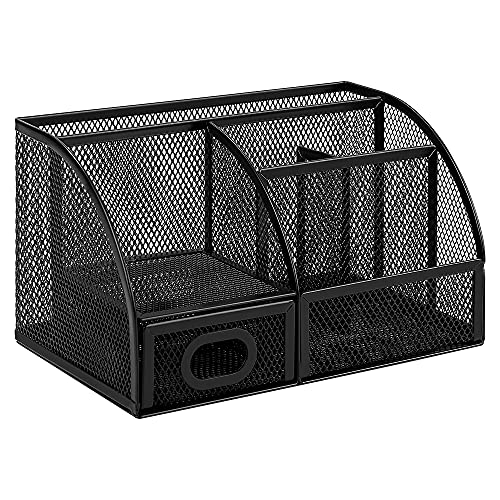
The Amazon Basics organizer skips sliding trays and specialized file storage in favor of an accessible caddy for writing utensils, scissors, letter openers, and ordinary office supplies. Its 9.1 by 5.9 by 5.5-inch dimensions provide useful height for long pencils and tools while keeping the width manageable beside a monitor or telephone.
Commercial-grade steel construction and a scratch-resistant, chip-resistant powder-coated finish give this model a practical office character. Mesh promotes airflow and reduces the broad horizontal ledges where dust tends to settle. Imagine a shared pin-up table where pens migrate constantly. A simple open caddy gives each tool an obvious landing spot without asking hurried users to open a drawer or remember a complicated category system.
Pros
- Open format keeps frequently used utensils immediately accessible
- Commercial-grade steel construction supports routine use
- Powder-coated finish resists scratches and chips
- Mesh surfaces help minimize visible dust buildup
- Moderate footprint fits many office and home desks
Cons
- No covered drawer is provided for tiny or visually distracting items
- It cannot organize documents, tracing pads, or project folders
This caddy suits a buyer who wants less fuss, fewer moving parts, and one central place for a modest collection of tools. It makes sense in shared work areas, reception spaces, or beside a drafting board where immediate access matters. Those who carefully separate fineliners by width, markers by tone, and clips by size will get more control from the compartment-rich top pick.
To buy this product, click here.
6. SUPEASY Five-Compartment File Holder: Best for Labeled Project Sorting

Project storage becomes far less mysterious when the categories are written on the organizer itself. The SUPEASY holder has five vertical compartments, each equipped with a front label slot. An architect could mark them “incoming,” “redline,” “consultants,” “client,” and “archive,” or assign one compartment to each live project and see the workflow at a glance.
At 16.34 by 12.01 by 12.4 inches, it is wider than the smaller vertical gianotter design and needs a substantial stretch of desk or credenza. That space buys broad, clearly divided storage for magazines, folders, notebooks, mail, and handouts. Sturdy metal mesh provides support while preserving visibility, a welcome feature when a deadline looms and the correct meeting packet needs to appear now, not after ten minutes of paper shuffling.
Pros
- Five vertical compartments separate multiple projects or workflow stages
- Individual label slots make categories immediately clear
- Metal mesh supports everyday folders and reference materials
- Vertical format keeps documents accessible without flat stacks
- Generous dimensions accommodate a substantial paper workload
Cons
- Its 16.34-inch width demands more desktop space than compact sorters
- Assembly is required, and no small-supply drawer is included
The SUPEASY is aimed at paper-heavy offices that value explicit labels more than tiny-item storage. It could be especially effective on a shared project counter, where several people need to return folders to the correct bay. A minimalist home office may find it imposing, but a team sorting specifications, finish schedules, and consultant correspondence can use those five broad lanes well.
To buy this product, click here.
7. Estune 36-Inch Blueprint Hanging Clamps: Best for Large Drawing Sets

Large sheets laugh at desktop letter trays. Estune takes a specialized route with 12 aluminum-alloy hanging clamps, each measuring 36 inches and listed to hold up to 100 sheets. The clamps secure plans without punching or stapling them, preserving the paper while turning a floppy drawing set into a manageable hanging group.
Internal steel springs hold a clamp open for loading, and a chromed steel wing knob closes the mechanism around the sheets. Clear plastic label holders at the front help distinguish architectural, structural, mechanical, and electrical sets before somebody pulls the wrong bundle from the rack. This is serious archive hardware with a cool metallic profile, but it requires a compatible hanging storage system that is not specified as part of the set.
Pros
- Twelve clamps support a sizable large-format drawing archive
- Each 36-inch clamp is listed to hold up to 100 sheets
- Documents do not need punched holes or staples
- Aluminum-alloy construction resists rust and corrosion
- Clear label holders simplify set identification
Cons
- A compatible hanging rack or cabinet is needed for complete storage
- The specialized format is excessive for digital-first users or small paper collections
These clamps make sense for architecture firms, plan rooms, contractors, or educational studios that repeatedly retrieve full-size sheets. Their capacity and labeling system are far beyond what a casual home desk requires. Buyers should first confirm that 36-inch clamps fit their drawings and hanging fixture, because compatibility matters more here than the sleek material or generous pack count.
To buy this product, click here.
8. ALVIN WRF55 Wire Bin Roll File: Best for Rolled Plans
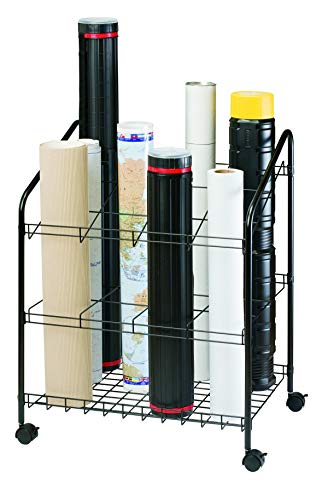
Rolled drawings have a habit of leaning into corners, sliding under tables, and becoming an unlabeled forest of white tubes. The ALVIN WRF55 gives those plans 12 defined openings, each measuring 5 by 5 inches. Its open wire design keeps rolls upright and separated, making individual sets easier to see and retrieve than they would be in one large undivided bin.
The overall unit measures 30 inches high, 24 inches wide, and 18 inches deep. Four swivel casters allow it to move between a plotter, project table, and storage wall without carrying every roll separately. Heavy-gauge black steel rods form the body, and assembly is required. Although larger than anything that belongs on a desk, it can clear the desk beautifully by moving bulky plans onto unused floor space.
Pros
- Twelve separate slots prevent rolled drawings from collapsing into one pile
- Five-inch square openings accommodate plans, maps, and document tubes
- Four swivel casters provide useful studio mobility
- Heavy-gauge steel rods form an open, accessible structure
- Floor-based storage frees desktop and table surfaces
Cons
- The 24 by 18-inch footprint requires dedicated floor space
- Open wire storage does not shield drawings from dust or moisture
Select the ALVIN if rolled media repeatedly invades chairs, corners, and drafting surfaces. It is particularly relevant near a wide-format printer, where fresh plots can be rolled, sorted, and wheeled toward the next review. Offices that require protected archives should use enclosed tubes or another covered system, while studios prioritizing fast access may appreciate this bin’s airy, straightforward layout.
To buy this product, click here.
9. Retractable Dimmable LED Desk Lamp: Best for Lighting and Cable Control

A lamp is an unconventional inclusion in a desk-organizer roundup, but architecture workstations often lose valuable space to separate task lights, phone chargers, and trailing cables. This retractable model consolidates lighting and USB charging in one base. Its 10 brightness levels and five color-temperature settings from 3000K to 6000K create 50 possible combinations for sketching, reading, model work, or screen-adjacent tasks.
The lamp uses 76 LED beads and lists a color rendering index above 80. Touch controls avoid a bank of protruding switches, while memory restores the previous light mode and brightness outside its reading mode. A 45-minute auto-off timer is included, and the adapter comes with the lamp. It will not sort a single pencil, yet its retractable form can reduce the hardware sprawl around a small desk.
Pros
- Ten brightness levels allow fine control over task illumination
- Five color temperatures span warm 3000K to cool 6000K light
- Integrated USB port reduces reliance on a separate desktop charger
- Retractable design can reclaim space when the lamp is idle
- Memory and 45-minute timer functions add day-to-day convenience
Cons
- It provides workspace consolidation rather than physical supply storage
- A listed CRI above 80 may be less appealing than higher-CRI lighting for color-critical presentation work
This lamp is most relevant to architects trying to declutter a compact digital workstation rather than store paper. The warm-to-cool range can shift between relaxed reading and crisp line work, while the charging port removes one adapter from the desk. Buyers seeking compartments should choose one of the first six products instead, and anyone evaluating finishes or presentation colors should decide whether the stated color-rendering specification meets the task.
To buy this product, click here.
How to Choose a Desk Organizer for Architecture Work
Start With the Material Causing the Mess
Organization works best when it targets a real nuisance. Pens rolling around call for angled cups or deep compartments. Active letter-size printouts benefit from trays, while labeled vertical slots suit sturdy project folders. Rolled plans need a tall bin, and full-size flat sheets may require hanging clamps. A designer who buys a handsome pencil caddy while drawing tubes remain piled beside the door has solved the smaller problem first.
Take a quick inventory during an ordinary workday. Notice what gets moved before sketching begins and what disappears during a deadline rush. Five fineliners, two scales, scissors, and clips fit a compact caddy. Five active project folders require vertical separation, while dozens of 36-inch sheets point toward specialized architectural storage.
Protect the Usable Drawing Surface
Dimensions matter because an organizer can occupy the exact patch of desk needed for tracing paper or a model base. Mark the proposed footprint with painter’s tape before buying. The compact Marbrasse organizer needs just 7.6 by 5.5 inches, while the SUPEASY holder stretches more than 16 inches wide. That difference feels enormous on a narrow student desk.
Height deserves attention around monitors, shelves, and tilted drafting surfaces. A tall file rack placed behind an angled board may block movement or become awkward to reach. Larger organizers often work better on a return, credenza, rolling cart, or nearby shelf, where they remain close without squeezing the creative work zone.
Match Storage Orientation to the Document
Horizontal trays support loose sheets and let each pile represent a workflow stage. Their drawback is visibility, since the page beneath the top sheet can disappear from memory. Vertical compartments reveal folders more clearly and use height efficiently, but loose paper may bend or slump unless it sits inside a file.
Rolled and hanging storage solve different large-format problems. A roll file offers quick, mobile access and accepts tubes, yet rolling can make sheets curl during the next review. Hanging clamps preserve grouped sheets without punching them, although they require compatible infrastructure and more deliberate filing. The right orientation depends on how often drawings move and how they must emerge at the review table.
Choose Compartments You Can Identify at a Glance
Visibility speeds up retrieval. Mesh walls reveal shapes and folder colors, transparent drawers expose small contents, and label holders remove guesswork in shared offices. During a hurried markup session, that clear visual cue can mean reaching directly for the structural set instead of rifling through five nearly identical folders.
Open storage also displays clutter, so visual calm may favor drawers for clips, blades, and adapters. A useful compromise places daily tools in open angled sections and reserves enclosed drawers for loose, sparkly little bits. The Marbrasse top pick follows that pattern, while the SUPEASY prioritizes visible, labeled documents.
Think About Material and Maintenance
Steel mesh provides a light visual profile and allows dust to pass through rather than collecting on broad shelves. Powder coating can help resist surface scratches and chips. ABS plastic feels less industrial and wipes clean readily, which may appeal near messy art supplies, graphite, or model-making adhesives.
Large-format storage faces different demands. Aluminum clamps resist rust and corrosion, while heavy-gauge steel gives the ALVIN roll file its structural framework. Open metal designs offer fast access but little environmental protection, so valuable archives may still need tubes, sleeves, or enclosed cabinets away from moisture and persistent sunlight.
Plan Categories Before Filling Every Slot
More compartments do not automatically create a better system. Assign broad, memorable categories such as drawing, cutting, measuring, and fastening. Tiny distinctions often collapse during a busy afternoon, leaving every slot half wrong and the desk covered again. A category should be obvious enough that a colleague can return an item without asking.
Leave a small amount of empty capacity for incoming work. A tray packed to the brim cannot accept tomorrow’s consultant package, and an overfilled pen section turns retrieval into a prickly handful of marker caps. Space is part of the system, not evidence that the organizer is too large.
Best Desk Organizers for Architects FAQ
What Type of Organizer Is Most Useful for an Architect?
A compartmented caddy is usually the most useful starting point for architects who sketch and mark up drawings daily. It should separate pens, pencils, markers, scales, scissors, erasers, and clips without taking over the desk. Paper-heavy workflows may gain more from trays or vertical file slots, while studios handling full-size plans need roll files or hanging storage.
Should Architectural Drawings Be Stored Flat, Rolled, or Hanging?
Flat storage avoids curl and works well for sheets that must remain ready for presentation, but large flat files consume considerable room. Rolled storage is compact and mobile, although drawings may retain curl. Hanging clamps keep sets grouped and accessible without punching holes, provided the office has a compatible rack or cabinet. Frequency of access, available space, and document value should guide the choice.
Are Vertical File Organizers Suitable for Loose Drawings?
They work best with folders, notebooks, magazines, or rigidly supported documents. Loose tracing paper and thin sheets can slump, crease, or slip between dividers. Place delicate pages in a folder or portfolio sleeve before storing them vertically, especially when the compartment is shared with heavier reference books.
How Much Desk Space Should an Organizer Use?
It should occupy space that is genuinely available after accounting for the keyboard, mouse, sketching area, and any tilting drawing surface. Tape out the listed width and depth on the desk, then perform a normal task. If your elbow lands inside the taped rectangle or tracing paper overlaps it, move toward a smaller caddy or relocate storage to a shelf or credenza.
Is Metal Mesh Better Than Plastic?
Neither material wins every use case. Metal mesh offers visibility, airflow, and an office-oriented appearance. Powder-coated steel can suit regular handling. Plastic is lightweight, water-resistant, and simple to wipe clean, which is useful around graphite dust and art materials. Construction, compartment layout, and footprint will usually affect daily use more than material alone.
How Should Pens and Markers Be Organized?
Follow the storage guidance from each pen or marker manufacturer, since some are intended to rest horizontally while others can stand upright. Group daily drafting instruments by function or line type rather than creating dozens of fiddly categories. Keep the most frequently used tools in open or angled sections, and place refills or specialty colors farther back.
Do Blueprint Hanging Clamps Include the Storage Rack?
The Estune product reviewed here is a set of 12 hanging clamps. A rack or cabinet is a separate compatibility concern unless the listing explicitly states that one is included. Check clamp length, hanging-system dimensions, drawing width, and available wall or floor space before committing to this storage method.
Can a Desk Lamp Really Improve Workspace Organization?
A multifunction lamp can consolidate task lighting and device charging, reducing the number of bases, adapters, and cables spread around a small desk. It does not replace a supply organizer, but a retractable lamp can free usable surface when folded away. This approach is most relevant to compact digital workstations where cable clutter competes with sketching room.
Final Verdict
The Marbrasse Mesh Pen Holder is our strongest overall option because its six tilted compartments, four flat sections, top tray, and drawer address the everyday mix found beside a sketchbook. It keeps frequently used tools visible while hiding clips and other tiny distractions. Architects managing a heavier stream of A4 or letter-size documents should consider the larger Marbrasse Desk Organizer With File Holder, whose sliding trays and vertical sections support a more structured paper workflow.
Scale should make the final decision. The compact two-drawer Marbrasse fits a student desk, the labeled SUPEASY holder suits multiple active projects, and the ALVIN WRF55 moves rolled plans off the work surface entirely. Firms archiving full-size sheets may prefer the Estune clamps after confirming rack compatibility. Measure the available footprint, identify the material that creates the most daily friction, and select the simplest organizer that gives every frequently used item an obvious place to land.
